React Interview Questions

1. What is React?

React is a front-end and open-source JavaScript library which is useful in developing user interfaces specifically for applications with a single page. It is helpful in building complex and reusable user interface(UI) components of mobile and web applications as it follows the component-based approach.
The important features of React are:
  • It supports server-side rendering.
  • It will make use of the virtual DOM rather than real DOM (Data Object Model) as RealDOM manipulations are expensive.
  • It follows unidirectional data binding or data flow.
  • It uses reusable or composable UI components for developing the view.

2. What are the advantages of using React?

MVC is generally abbreviated as Model View Controller.
  • Use of Virtual DOM to improve efficiency: React uses virtual DOM to render the view. As the name suggests, virtual DOM is a virtual representation of the real DOM. Each time the data changes in a react app, a new virtual DOM gets created. Creating a virtual DOM is much faster than rendering the UI inside the browser. Therefore, with the use of virtual DOM, the efficiency of the app improves.
  • Gentle learning curve:React has a gentle learning curve when compared to frameworks like Angular. Anyone with little knowledge of javascript can start building web applications using React.
  • SEO friendly:React allows developers to develop engaging user interfaces that can be easily navigated in various search engines. It also allows server-side rendering, which boosts the SEO of an app.
  • Reusable components:React uses component-based architecture for developing applications. Components are independent and reusable bits of code. These components can be shared across various applications having similar functionality. The re-use of components increases the pace of development.
  • Huge ecosystem of libraries to choose from:React provides you with the freedom to choose the tools, libraries, and architecture for developing an application based on your requirement.

3. What are the limitations of React?

The few limitations of React are as given below:
  • React is not a full-blown framework as it is only a library.
  • The components of React are numerous and will take time to fully grasp the benefits of all.
  • It might be difficult for beginner programmers to understand React.
  • Coding might become complex as it will make use of inline templating and JSX.

4. What is useState() in React?

The useState() is a built-in React Hook that allows you for having state variables in functional components. It should be used when the DOM has something that is dynamically manipulating/controlling.
In the below-given example code, The useState(0) will return a tuple where the count is the first parameter that represents the counter’s current state and the second parameter setCounter method will allow us to update the state of the counter.
....
const [count, setCounter] = useState(0);
const [otherStuffs, setOtherStuffs] = useState("...");
....
const setCount = () => {
   setCounter(count + 1);
   setOtherStuffs("Updated value...");
   ... 
};
We can make use of setCounter() method for updating the state of count anywhere. In this example, we are using setCounter() inside the setCount function where various other things can also be done. The idea with the usage of hooks is that we will be able to keep our code more functional and avoid class-based components if they are not required.

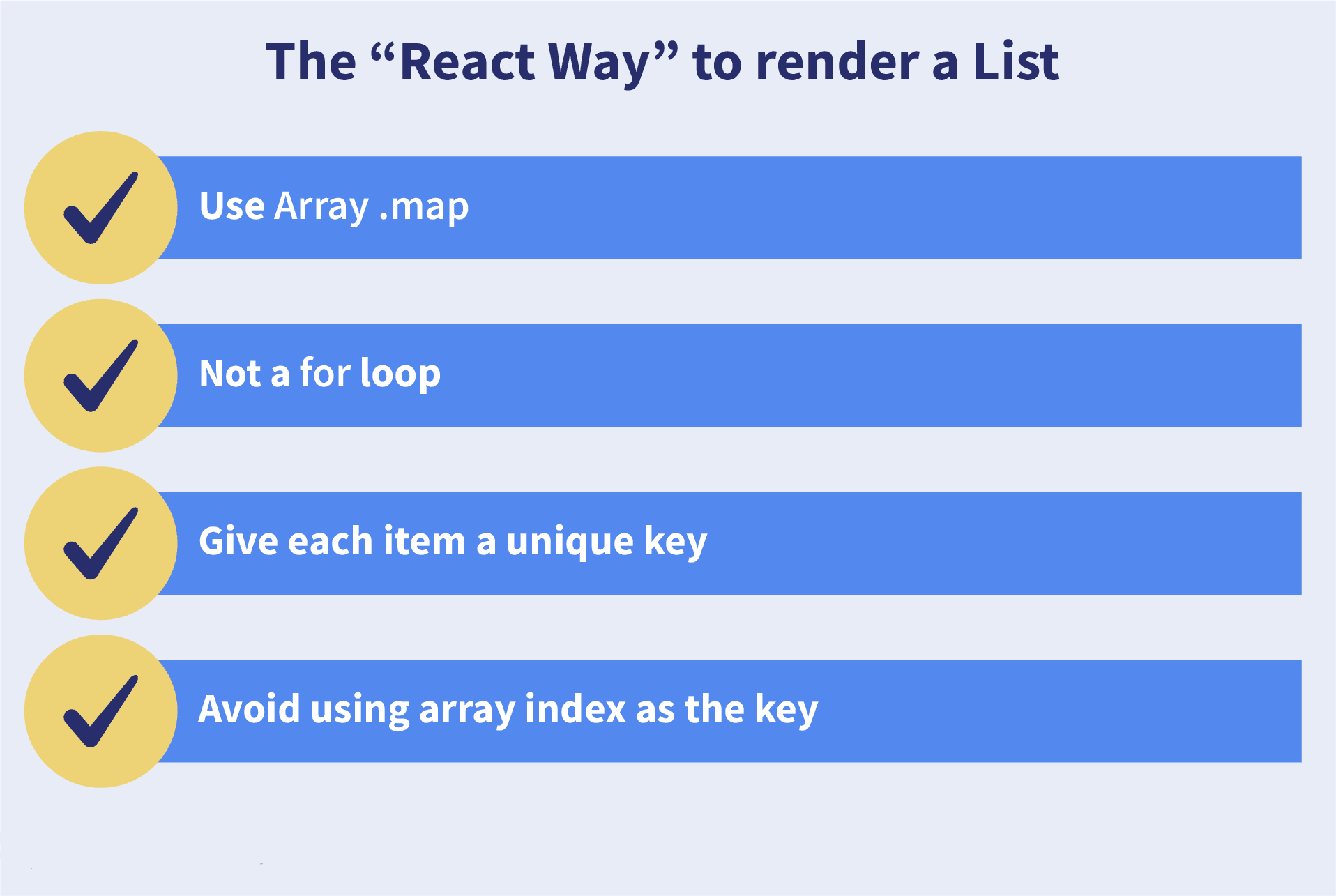
5. What are keys in React?

A key is a special string attribute that needs to be included when using lists of elements.
What are keys in React
Example of a list using key -
const ids = [1,2,3,4,5];
const listElements = ids.map((id) => {
  return (
    <li key={id.toString()}>
      {id}
    </li>
  )
})
Importance of keys -
  • Keys help react identify which elements were added, changed or removed.
  • Keys should be given to array elements for providing a unique identity for each element.
  • Without keys, React does not understand the order or uniqueness of each element.
  • With keys, React has an idea of which particular element was deleted, edited, and added.
  • Keys are generally used for displaying a list of data coming from an API.
***Note - Keys used within arrays should be unique among siblings. They need not be globally unique.

6. What is JSX?

JSX stands for JavaScript XML. It allows us to write HTML inside JavaScript and place them in the DOM without using functions like appendChild() or createElement().
As stated in the official docs of React, JSX provides syntactic sugar for React.createElement() function.
Note: We can create React applications without using JSX as well.
How JSX works:
Without using JSX:
const text = React.createElement('p', {}, 'This is a text');
const container = React.createElement('div', {}, text);
ReactDOM.render(container, rootElement);
Using JSX:
const container = (
  <div>
    <h5>This is a text</h5>
  </div>
);
ReactDOM.render(container, rootElement);
As one can see in the code above, we are directly using HTML inside JavaScript.

7. What are the differences between functional and class components?

Before the introduction of Hooks in React, functional components were called stateless components and had fewer features than class components. After the introduction of Hooks, functional components are equivalent to class components.
Although functional components are now the trend, the React team still supports class components. Therefore, it’s important to know their differences.

1. Declaration

Functional components are JavaScript functions:
function Card(props){
  return (
    <div className="main-container">
      <h2>Title of the card</h2>
    </div>
  );
}

const Card = (props) => {
  return (
    <div className="main-container">
      <h2>Title of the card</h2>
    </div>
  );
};
Class components use ES6 classes:
class Card extends React.Component {
  constructor(props) {
    super(props);
  }
  render() {
    return (
      <div className="main-container">
        <h2>Title of the card</h2>
      </div>
    );
  }
}

2. Handling props

Example component usage:
<StudentInfo name="Vivek" rollNumber="23" />
In functional components:
function StudentInfo(props){
  return (
    <div className="main">
      <h2>{props.name}</h2>
      <h4>{props.rollNumber}</h4>
    </div>
  );
}
In class components:
class StudentInfo extends React.Component {
  constructor(props) {
    super(props);
  }
  render() {
    return (
      <div className="main">
        <h2>{this.props.name}</h2>
        <h4>{this.props.rollNumber}</h4>
      </div>
    );
  }
}

3. Handling state

Functional components use useState hook:
function ClassRoom(props){
  const [studentsCount, setStudentsCount] = useState(0);

  const addStudent = () => {
    setStudentsCount(studentsCount + 1);
  };

  return (
    <div>
      <h5>Number of students in class room: {studentsCount}</h5>
      <button onClick={addStudent}>Add Student</button>
    </div>
  );
}
Class components use this.state and setState:
class ClassRoom extends React.Component {
  constructor(props){
    super(props);
    this.state = { studentsCount: 0 };
    this.addStudent = this.addStudent.bind(this);
  }

  addStudent() {
    this.setState(prevState => ({
      studentsCount: prevState.studentsCount + 1
    }));
  }

  render(){
    return (
      <div>
        <h5>Number of students in class room: {this.state.studentsCount}</h5>
        <button onClick={this.addStudent}>Add Student</button>
      </div>
    );
  }
}

8. What is the virtual DOM? How does React use the virtual DOM to render the UI?

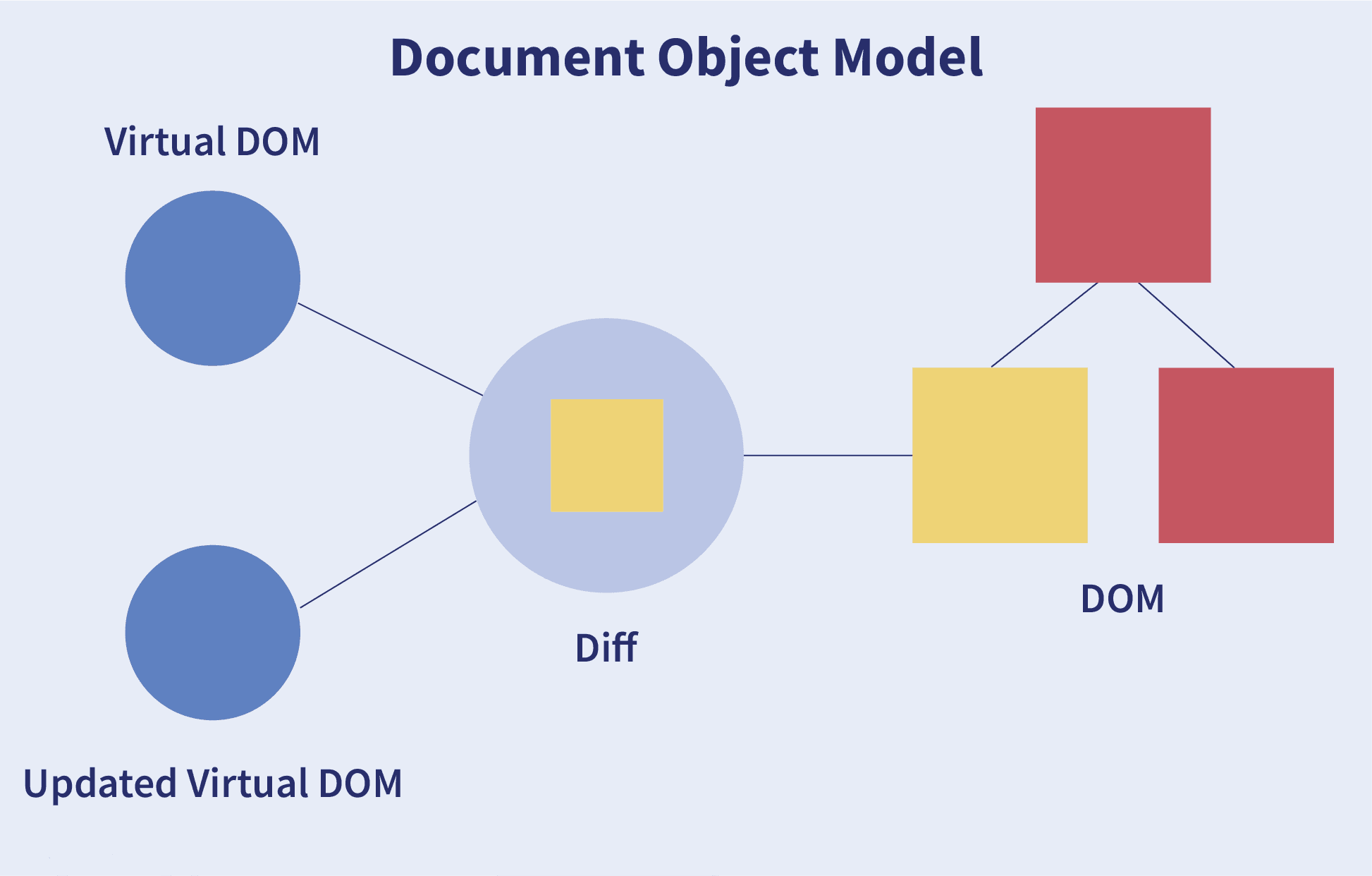
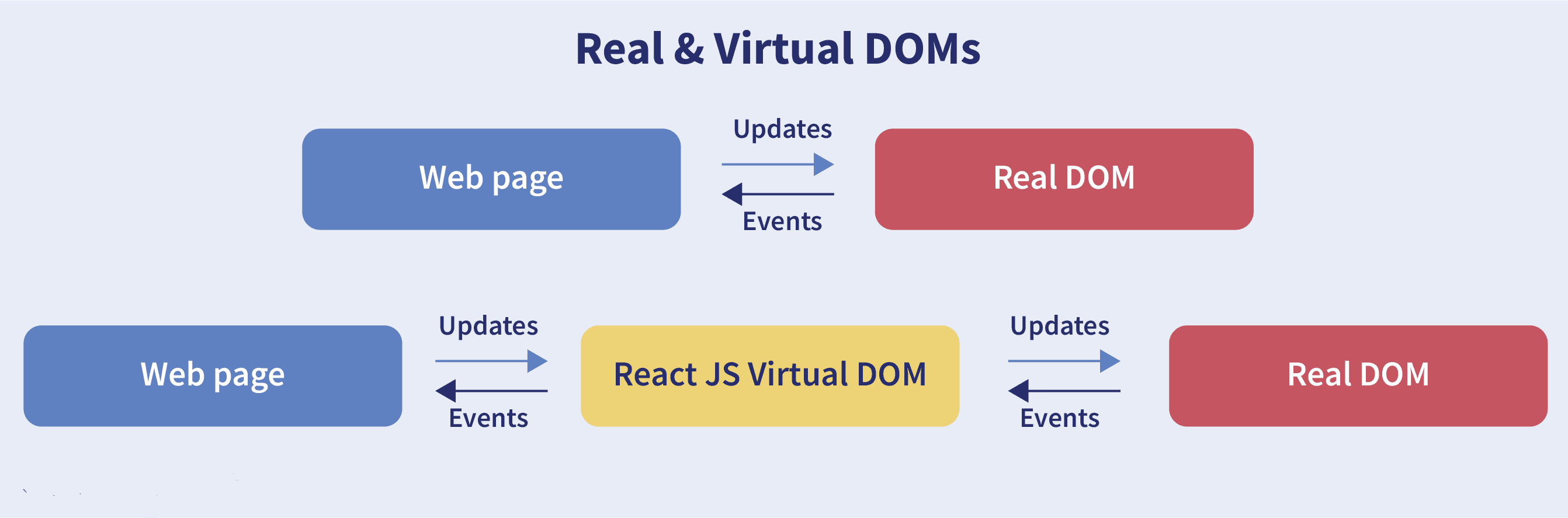
As stated by the React team, virtual DOM is a concept where a virtual representation of the real DOM is kept inside memory and is synced with the real DOM by a library such as ReactDOM.
Virtual DOM

Why was virtual DOM introduced?

DOM manipulation is an integral part of any web application, but it’s relatively slow compared to other JavaScript operations. The efficiency of the application decreases when several DOM manipulations are done. Most JavaScript frameworks update the entire DOM even when only a small part changes.
For example, consider a list rendered in the DOM. If one of the items in the list changes, the entire list gets re-rendered instead of just the updated item. This is called inefficient updating.
To solve this, the React team introduced the concept of the virtual DOM.

How does it work?

How Virtual DOM Works
For every DOM object, there is a corresponding virtual DOM object (copy) with the same properties. The main difference is that any changes in the virtual DOM will not directly reflect on the screen. Think of the virtual DOM as a blueprint of the real DOM.
Whenever a JSX element gets rendered, every virtual DOM object gets updated.
**Note:** Updating every virtual DOM object might seem inefficient, but it’s much faster than updating the real DOM since we’re only updating the blueprint.
React uses two virtual DOMs — one for the current state and one for the previous state. When the virtual DOM updates, React compares the two to find which objects changed, then updates only those in the real DOM.
This way, React solves the problem of inefficient updating.

9. What are the differences between controlled and uncontrolled components?

Controlled and uncontrolled components are just different approaches to handling input from elements in React.
FeatureUncontrolledControlledName attrs
One-time value retrieval (e.g. on submit)✔️✔️✔️
Validating on submit✔️✔️✔️
Field-level Validation✔️✔️
Conditionally disabling submit button✔️✔️
Enforcing input format✔️✔️
Several inputs for one piece of data✔️✔️
Dynamic inputs✔️🤔

Controlled component

In a controlled component, the value of the input element is controlled by React. We store the state of the input element inside the code, and by using event-based callbacks, any changes made to the input element will be reflected in the code as well.
function FormValidation(props) {
  let [inputValue, setInputValue] = useState("");
  let updateInput = e => {
    setInputValue(e.target.value);
  };
  return (
    <div>
      <form>
        <input type="text" value={inputValue} onChange={updateInput} />
      </form>
    </div>
  );
}

Uncontrolled component

In an uncontrolled component, the value of the input element is handled by the DOM itself. Input elements work just like normal HTML form elements. We can use ref to access their values.
function FormValidation(props) {
  let inputValue = React.createRef();
  let handleSubmit = e => {
    alert(`Input value: ${inputValue.current.value}`);
    e.preventDefault();
  };
  return (
    <div>
      <form onSubmit={handleSubmit}>
        <input type="text" ref={inputValue} />
        <button type="submit">Submit</button>
      </form>
    </div>
  );
}

10. What are props in React?

The props in React are the inputs to a component. They can be single-valued or objects having a set of values that will be passed to components during creation, using a naming convention that looks similar to HTML-tag attributes. In simple terms, props are the data passed from a parent component into a child component.

Main purposes of props:

  • Passing custom data to the React component.
  • Using through this.props.reactProp inside the render() method of a class component.
  • Triggering state changes.

Example:

Creating an element with reactProp property:
<Element reactProp="1" />
The reactProp name will be considered as a property attached to the native props object of React, which already exists on each component created with the help of the React library:
props.reactProp;

11. Explain React state and props?

PropsState
ImmutableOwned by its component
Has better performanceLocally scoped
Can be passed to child componentsWriteable / Mutable
Has setState() method to modify properties
Changes to state can be asynchronous
Can only be passed as props

React State

Every component in React has a built-in state object, which contains all the property values that belong to that component. Any change in the state object leads to re-rendering of the component.
Note: State object is not available in functional components, but we can use React Hooks to add state.
How to declare a state object:
class Car extends React.Component {
  constructor(props) {
    super(props);
    this.state = {
      brand: "BMW",
      color: "Black"
    };
  }
}
How to use and update the state object:
class Car extends React.Component {
  constructor(props) {
    super(props);
    this.state = {
      brand: "BMW",
      color: "Black"
    };
  }
  changeColor() {
    this.setState({ color: "Red" });
  }
  render() {
    return (
      <div>
        <button onClick={() => this.changeColor()}>Change Color</button>
        <h5>{this.state.color}</h5>
      </div>
    );
  }
}

React Props

Props (short for properties) are inputs to a React component. They are passed as HTML attributes and received by the component as an object. Props allow data to be passed from parent to child components.
Passing props to a component:
<Car brand="Mercedes" />
Using props in Class Component:
class Car extends React.Component {
  constructor(props) {
    super(props);
    this.state = {
      brand: this.props.brand,
      color: "Black"
    };
  }
}
Using props in Functional Component:
function Car(props) {
  let [brand, setBrand] = useState(props.brand);
}
Note: Props are read-only and cannot be changed inside a component.

12. Explain about types of side effects in React component?

There are two types of side effects in a React component:
  • Effects without Cleanup:This type of effect in useEffect does not block the browser from updating the screen. It improves the responsiveness of the application. Common examples include:
    • Network requests
    • Logging
    • Manual DOM manipulations
  • Effects with Cleanup:Some effects require cleanup after the DOM has been updated. For example, setting up an external data source subscription requires cleanup to prevent memory leaks. React will automatically clean up effects when the component unmounts.
    These effects run after every render, and before running the next effect, React cleans up the previous one.

13. What is prop drilling in React?

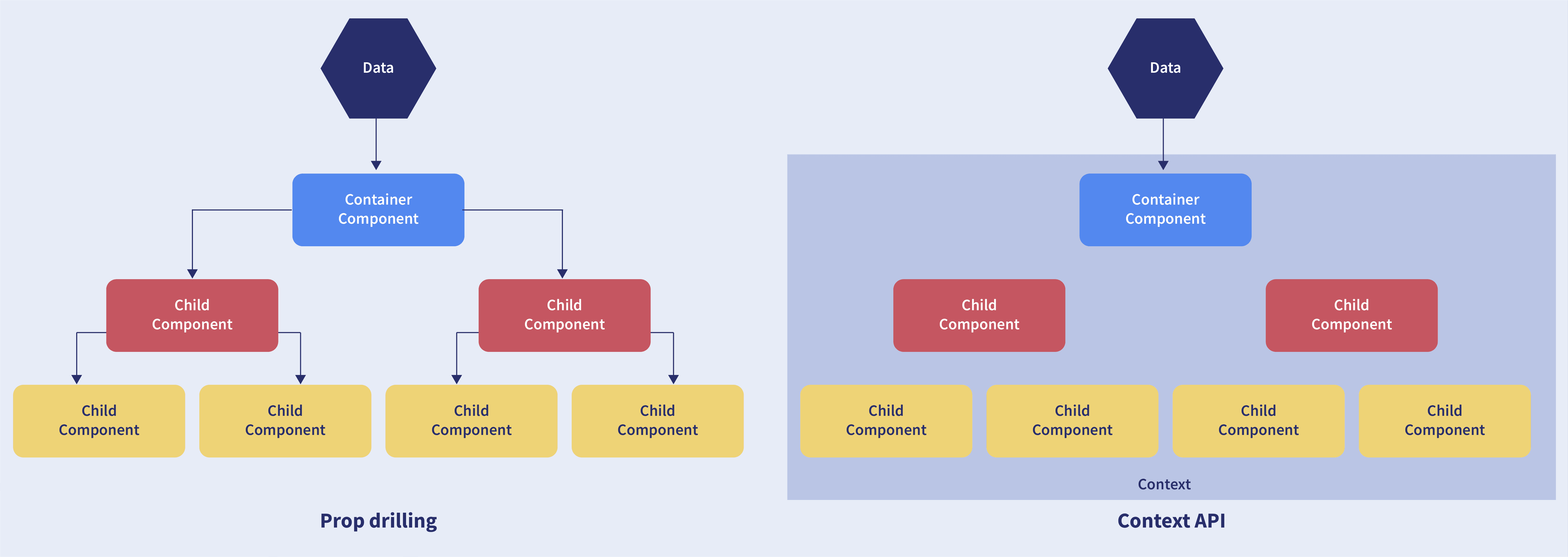
Prop Drilling in React
Sometimes while developing React applications, we need to pass data from a component that is higher in the hierarchy to a deeply nested component. To do this, we pass props from the source component and keep forwarding the props through each intermediate component until it reaches the target.
Disadvantage: Components that should otherwise not be aware of the data end up having access to it, which can make the code harder to maintain.

14. What are error boundaries?

Introduced in version 16 of React, Error Boundaries provide a way to catch errors that occur in the render phase.

What is an error boundary?

Any component that implements one of the following lifecycle methods is considered an error boundary:
  1. Render phase
  2. Inside a lifecycle method
  3. Inside the constructor

Without using error boundaries:

class CounterComponent extends React.Component {
  constructor(props) {
    super(props);
    this.state = { counterValue: 0 };
    this.incrementCounter = this.incrementCounter.bind(this);
  }
  incrementCounter() {
    this.setState(prevState => counterValue = prevState + 1);
  }
  render() {
    if (this.state.counter === 2) {
      throw new Error('Crashed');
    }
    return (
      <div>
        <button onClick={this.incrementCounter}>Increment Value</button>
        <h5>Value of counter: {this.state.counterValue}</h5>
      </div>
    );
  }
}
Without an error boundary, when an error occurs in render, the entire component unmounts and you may see a blank page.

With error boundaries:

Error boundaries use getDerivedStateFromError to render a fallback UI and componentDidCatch to log error information.
class ErrorBoundary extends React.Component {
  constructor(props) {
    super(props);
    this.state = { hasError: false };
  }
  static getDerivedStateFromError(error) {
    return { hasError: true };
  }
  componentDidCatch(error, errorInfo) {
    logErrorToMyService(error, errorInfo);
  }
  render() {
    if (this.state.hasError) {
      return <h4>Something went wrong</h4>;
    }
    return this.props.children;
  }
}
Usage example:
<ErrorBoundary>
  <CounterComponent />
</ErrorBoundary>

15. What is React Hooks?

React Hooks are the built-in functions that allow developers to use state and lifecycle methods within React components. These were introduced in React 16.8.
Each lifecycle of a component includes mount, unmount, and update phases. Along with that, components have properties and states. Hooks enable developers to use these features with improved code reuse and more flexibility in navigating the component tree.
With Hooks, all features of React can be used without writing class components.
Example: Before React 16.8, you needed a class component to manage state. Now, with the useState hook, you can keep state in a functional component.

16. Explain React Hooks?

What are Hooks? Hooks are functions that let us “hook into” React state and lifecycle features from a functional component.
React Hooks cannot be used in class components. They allow us to write components without using class syntax.
Why were Hooks introduced in React? Hooks were introduced in React version 16.8. Before this, functional components were called stateless components, and only class components could handle state and lifecycle methods. The need to convert functional components into class components for such features led to the development of Hooks.
Example of a hook: useState hook
In functional components, the useState hook lets us define a state for a component:
function Person(props) {
  // We are declaring a state variable called name.
  // setName is a function to update/change the value of name
  let [name, setName] = useState('');
}
The state variable name can be directly used inside the HTML.

17. What are the rules that must be followed while using React Hooks?

There are 2 rules which must be followed while you code with Hooks:
  • React Hooks must be called only at the top level. It is not allowed to call them inside nested functions, loops, or conditions.
  • Hooks can be called only from React Function Components.

18. What is the use of useEffect React Hooks?

The useEffect React Hook is used for performing side effects in functional components. It lets React know that your component needs to do something after rendering or after a state change.
Common side effects include data fetching, updating the document title, and manually manipulating the DOM. The useEffect Hook runs by default after the first render and after every update, ensuring the DOM is updated before the effect runs.
Syntax:
useEffect(callback, [dependencies]);
- callback: The function containing the side-effect logic. - dependencies: Optional array — the effect will only re-run if these values change.
Example:
import { useEffect } from 'react';

function WelcomeGreetings({ name }) {
  const msg = `Hi, ${name}!`; // Calculates output

  useEffect(() => {
    document.title = `Welcome to you ${name}`; // Side-effect!
  }, [name]);

  return <div>{msg}</div>; // Calculates output
}
In the above example, the document title updates only when name changes because it is provided in the dependencies array.

19. Why do React Hooks make use of refs?

Earlier, refs were only available in class components, but now they can also be used in function components via the useRef Hook.

Refs are used for:

  • Managing focus, media playback, or text selection.
  • Integrating with third-party DOM libraries.
  • Triggering imperative animations.

20. What are Custom Hooks?

A Custom Hook is a JavaScript function whose name begins with use and which calls other hooks. It was introduced in React v16.8 and allows you to reuse stateful logic without restructuring your component hierarchy.
In most cases, custom hooks can replace Render Props and Higher-Order Components (HoCs), helping reduce the amount of nesting in your components. This avoids multiple layers of abstraction or "wrapper hell".
Disadvantage: Custom Hooks cannot be used inside class components.

React Interview Questions for Experienced

1. How to perform automatic redirect after login?

The <Redirect> component from the react-router package is used for automatic navigation. Rendering it will navigate to a new location, replacing the current one in the history stack — similar to server-side redirects.
import React, { Component } from 'react'
import { Redirect } from 'react-router'

export default class LoginDemoComponent extends Component {
  render() {
    if (this.state.isLoggedIn === true) {
      return <Redirect to="/your/redirect/page" />
    } else {
      return <div>{'Please complete login'}</div>
    }
  }
}

Conclusion

React is widely adopted by top IT companies such as Facebook, PayPal, Instagram, Uber, etc., especially in India. React Hooks have become increasingly popular for simplifying state management.
This article covers frequently asked ReactJS and React Hooks interview questions. Remember, interview success isn’t just about technical skills — it also depends on mindset and the impression you make. Good luck!

Useful References and Resources:

2. How to pass data between sibling components using React router?

Passing data between sibling components of React is possible using React Router with the help of history.push and match.params.
In the code given below, we have a Parent component AppDemo.js and two Child Components HomePage and AboutPage. Everything is kept inside a Router using React Router <Route />. It also includes a route for /about/:params where data will be passed.
import React, { Component } from 'react';
class AppDemo extends Component {
  render() {
    return (
      <Router>
        <div className="AppDemo">
          <ul>
            <li>
              <NavLink to="/" activeStyle={{ color: 'blue' }}>Home</NavLink>
            </li>
            <li>
              <NavLink to="/about" activeStyle={{ color: 'blue' }}>About</NavLink>
            </li>
          </ul>
          <Route path="/about/:aboutId" component={AboutPage} />
          <Route path="/about" component={AboutPage} />
          <Route path="/" component={HomePage} />
        </div>
      </Router>
    );
  }
}
export default AppDemo;
The HomePage is a functional component with a button. On button click, we use props.history.push('/about/' + data) to navigate programmatically.
export default function HomePage(props) {
  const handleClick = (data) => {
    props.history.push('/about/' + data);
  }

  return (
    <div>
      <button onClick={() => handleClick('DemoButton')}>To About</button>
    </div>
  );
}
The AboutPage functional component receives the data from props.match.params.aboutId.
export default function AboutPage(props) {
  if (!props.match.params.aboutId) {
    return <div>No Data Yet</div>;
  }

  return (
    <div>
      { `Data obtained from HomePage is ${props.match.params.aboutId}` }
    </div>
  );
}
After clicking the button on the HomePage, the page will look like this:
React Router Sibling Data Flow

3. How to re-render the view when the browser is resized?

It is possible to listen to the resize event in componentDidMount() and then update the width and height dimensions. It requires removing the event listener in the componentWillUnmount() method.
Using the code below, we can re-render the view when the browser is resized:
class WindowSizeDimensions extends React.Component {
  constructor(props){
    super(props);
    this.updateDimension = this.updateDimension.bind(this);
    this.state = {
      width: window.innerWidth,
      height: window.innerHeight
    };
  }

  componentWillMount() {
    this.updateDimension();
  }

  componentDidMount() {
    window.addEventListener('resize', this.updateDimension);
  }

  componentWillUnmount() {
    window.removeEventListener('resize', this.updateDimension);
  }

  updateDimension() {
    this.setState({ width: window.innerWidth, height: window.innerHeight });
  }

  render() {
    return <span>{this.state.width} x {this.state.height}</span>;
  }
}

4. How to create a switching component for displaying different pages?

A switching component refers to a component that renders one of multiple components dynamically. This is typically done using an object to map prop values to components.
The example below demonstrates how to display different pages using a single switching component based on the page prop.
import HomePage from './HomePage'
import AboutPage from './AboutPage'
import FacilitiesPage from './FacilitiesPage'
import ContactPage from './ContactPage'
import HelpPage from './HelpPage'

const PAGES = {
  home: HomePage,
  about: AboutPage,
  facilitiess: FacilitiesPage,
  contact: ContactPage,
  help: HelpPage
}

const Page = (props) => {
  const Handler = PAGES[props.page] || HelpPage;
  return <Handler {...props} />
}

// The PAGES object keys can be used in the prop types for catching errors during dev-time.
Page.propTypes = {
  page: PropTypes.oneOf(Object.keys(PAGES)).isRequired
}

5. Explain how to create a simple React Hooks example program?

I will assume you have some coding knowledge about JavaScript and have installed Node.js on your system. Node includes CLI tools: npm for installing packages and npx for running Node commands. When a command isn’t installed locally, npx fetches it from npmjs.com and runs it without a local install.
This makes it very convenient to generate a new React project quickly.
Open your terminal in any folder and run:
npx create-react-app react-items-with-hooks
The above command uses Facebook’s create-react-app, which creates a folder named react-items-with-hooks and sets up a basic React project. You can open the project in your IDE and check the src folder. Inside it, you'll find the main component App.js.
That file contains the App() function, which returns JSX – an extended JavaScript syntax allowing HTML-style tags inside JS. React will compile this into valid JavaScript to render HTML elements.
You can define your own React components by writing a function that returns a JSX element. Create a new file:src/SearchItem.js and insert the following code:
import React from 'react';
export function SearchItem() {
  return (
    <div>
      <div className="search-input">
        <input type="text" placeholder="SearchItem" />
      </div>
      <h1 className="h1">Search Results</h1>
      <div className="items">
        <table>
          <thead>
            <tr>
              <th className="itemname-col">Item Name</th>
              <th className="price-col">Price</th>
              <th className="quantity-col">Quantity</th>
            </tr>
          </thead>
          <tbody></tbody>
        </table>
      </div>
    </div>
  );
}
This component just renders a static layout — an empty table. Now, open src/App.js and import it:
import { SearchItem } from './SearchItem';
Then, remove the default logo import and replace the contents of the App() function with:
<div className="App">
  <header>
    Items with Hooks
  </header>
  <SearchItem />
</div>
Note how the <SearchItem /> tag is used like an HTML element. JSX makes it easy to include components this way.
Run the app with the following command in your terminal to launch it in the browser:
npm start
This command will compile your application and open your default browser into http://localhost:4000 This command can be kept on running when code development is in progress to make sure that the application is up-to-date, and also this browser page will be reloaded each time you modify and save the code.
This application will work finely, but it doesn’t look nice as it doesn’t react to any input from the user. You can make it more interactive by adding a state with React Hooks, adding authentication, etc.

6. Explain conditional rendering in React?

Conditional rendering refers to the dynamic output of user interface markups based on a condition state. It works in the same way as JavaScript conditions. Using conditional rendering, it is possible to toggle specific application functions, API data rendering, hide or show elements, decide permission levels, authentication handling, and so on.
There are different approaches for implementing conditional rendering in React. Some of them are:
  • Using if-else conditional logic which is suitable for smaller as well as for medium-sized applications
  • Using ternary operators, which takes away some amount of complication from if-else statements
  • Using element variables, which will enable us to write cleaner code.

7. Can React Hook replaces Redux?

The React Hook cannot be considered as a replacement for Redux (It is an open-source, JavaScript library useful in managing the application state) when it comes to the management of the global application state tree in large complex applications, even though the React will provide a useReducer hook that manages state transitions similar to Redux. Redux is very useful at a lower level of component hierarchy to handle the pieces of a state which are dependent on each other, instead of a declaration of multiple useState hooks.
In commercial web applications which is larger, the complexity will be high, so using only React Hook may not be sufficient. Few developers will try to tackle the challenge with the help of React Hooks and others will combine React Hooks with the Redux.

8. What is React Router?

React Router refers to the standard library used for routing in React. It permits us for building a single-page web application in React with navigation without even refreshing the page when the user navigates. It also allows to change the browser URL and will keep the user interface in sync with the URL. React Router will make use of the component structure for calling the components, using which appropriate information can be shown. Since React is a component-based framework, it’s not necessary to include and use this package. Any other compatible routing library would also work with React.
The major components of React Router are given below:
  • BrowserRouter: It is a router implementation that will make use of the HTML5 history API (pushState, popstate, and event replaceState) for keeping your UI to be in sync with the URL. It is the parent component useful in storing all other components.
  • Routes: It is a newer component that has been introduced in the React v6 and an upgrade of the component.
  • Route: It is considered to be a conditionally shown component and some UI will be rendered by this whenever there is a match between its path and the current URL.
  • Link: It is useful in creating links to various routes and implementing navigation all over the application. It works similarly to the anchor tag in HTML.

9. Do Hooks cover all the functionalities provided by the classes?

Our goal is for Hooks to cover all the functionalities for classes at its earliest. There are no Hook equivalents for the following methods that are not introduced in Hooks yet:
  • getSnapshotBeforeUpdate()
  • getDerivedStateFromError()
  • componentDidCatch()
Since it is an early time for Hooks, few third-party libraries may not be compatible with Hooks at present, but they will be added soon.

10. How does the performance of using Hooks will differ in comparison with the classes?

  • React Hooks will avoid a lot of overheads such as the instance creation, binding of events, etc., that are present with classes.
  • Hooks in React will result in smaller component trees since they will be avoiding the nesting that exists in HOCs (Higher Order Components) and will render props which result in less amount of work to be done by React.

11. Differentiate React Hooks vs Classes?

React HooksClasses
It is used in functional components of React.It is used in class-based components of React.
It will not require a declaration of any kind of constructor.It is necessary to declare the constructor inside the class component.
It does not require the use of this keyword in state declaration or modification.Keyword this will be used in state declaration (this.state) and in modification (this.setState()).
It is easier to use because of the useState functionality.No specific function is available for helping us to access the state and its corresponding setState variable.
React Hooks can be helpful in implementing Redux and context API.Because of the long setup of state declarations, class states are generally not preferred.

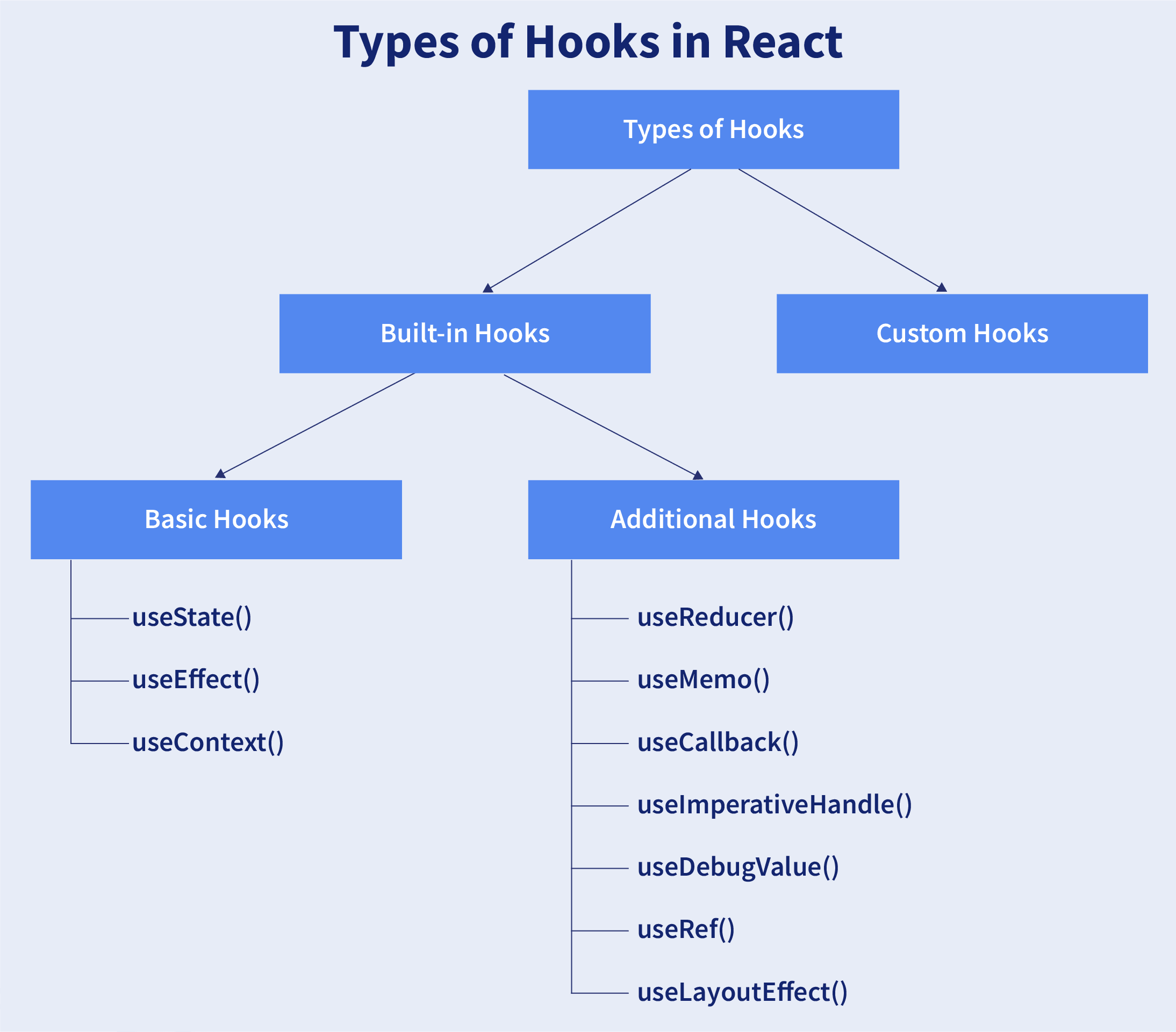
12. Explain about types of Hooks in React?

There are two types of Hooks in React. They are:
1. Built-in Hooks: The built-in Hooks are divided into 2 parts as given below:
  • Basic Hooks:
    • useState(): This functional component is used to set and retrieve the state.
    • useEffect(): It enables for performing the side effects in the functional components.
    • useContext(): It is used for creating common data that is to be accessed by the components hierarchy without having to pass the props down to each level.
  • Additional Hooks:
    • useReducer() : It is used when there is a complex state logic that is having several sub-values or when the upcoming state is dependent on the previous state. It will also enable you to optimization of component performance that will trigger deeper updates as it is permitted to pass the dispatch down instead of callbacks.
    • useMemo() : This will be used for recomputing the memoized value when there is a change in one of the dependencies. This optimization will help for avoiding expensive calculations on each render.
    • useCallback() : This is useful while passing callbacks into the optimized child components and depends on the equality of reference for the prevention of unneeded renders.
    • useImperativeHandle(): It will enable modifying the instance that will be passed with the ref object.
    • useDebugValue(): It is used for displaying a label for custom hooks in React DevTools.
    • useRef() : It will permit creating a reference to the DOM element directly within the functional component.
    • useLayoutEffect(): It is used for the reading layout from the DOM and re-rendering synchronously.
2. Custom Hooks: A custom Hook is basically a function of JavaScript. The Custom Hook working is similar to a regular function. The “use” at the beginning of the Custom Hook Name is required for React to understand that this is a custom Hook and also it will describe that this specific function follows the rules of Hooks. Moreover, developing custom Hooks will enable you for extracting component logic from within reusable functions.
Types of Hooks in React

13. Does React Hook work with static typing?

Static typing refers to the process of code check during the time of compilation for ensuring all variables will be statically typed. React Hooks are functions that are designed to make sure about all attributes must be statically typed. For enforcing stricter static typing within our code, we can make use of the React API with custom Hooks.

14. What are the lifecycle methods of React?

React lifecycle hooks will have the methods that will be automatically called at different phases in the component lifecycle and thus it provides good control over what happens at the invoked point. It provides the power to effectively control and manipulate what goes on throughout the component lifecycle.
For example, if you are developing the YouTube application, then the application will make use of a network for buffering the videos and it consumes the power of the battery (assume only these two). After playing the video if the user switches to any other application, then you should make sure that the resources like network and battery are being used most efficiently. You can stop or pause the video buffering which in turn stops the battery and network usage when the user switches to another application after video play.
So we can say that the developer will be able to produce a quality application with the help of lifecycle methods and it also helps developers to make sure to plan what and how to do it at different points of birth, growth, or death of user interfaces.
The various lifecycle methods are:
  • constructor(): This method will be called when the component is initiated before anything has been done. It helps to set up the initial state and initial values.
  • getDerivedStateFromProps(): This method will be called just before element(s) rendering in the DOM. It helps to set up the state object depending on the initial props. The getDerivedStateFromProps() method will have a state as an argument and it returns an object that made changes to the state. This will be the first method to be called on an updating of a component.
  • render(): This method will output or re-render the HTML to the DOM with new changes. The render() method is an essential method and will be called always while the remaining methods are optional and will be called only if they are defined.
  • componentDidMount(): This method will be called after the rendering of the component. Using this method, you can run statements that need the component to be already kept in the DOM.
  • shouldComponentUpdate(): The Boolean value will be returned by this method which will specify whether React should proceed further with the rendering or not. The default value for this method will be True.
  • getSnapshotBeforeUpdate(): This method will provide access for the props as well as for the state before the update. It is possible to check the previously present value before the update, even after the update.
  • componentDidUpdate(): This method will be called after the component has been updated in the DOM.
  • componentWillUnmount(): This method will be called when the component removal from the DOM is about to happen.

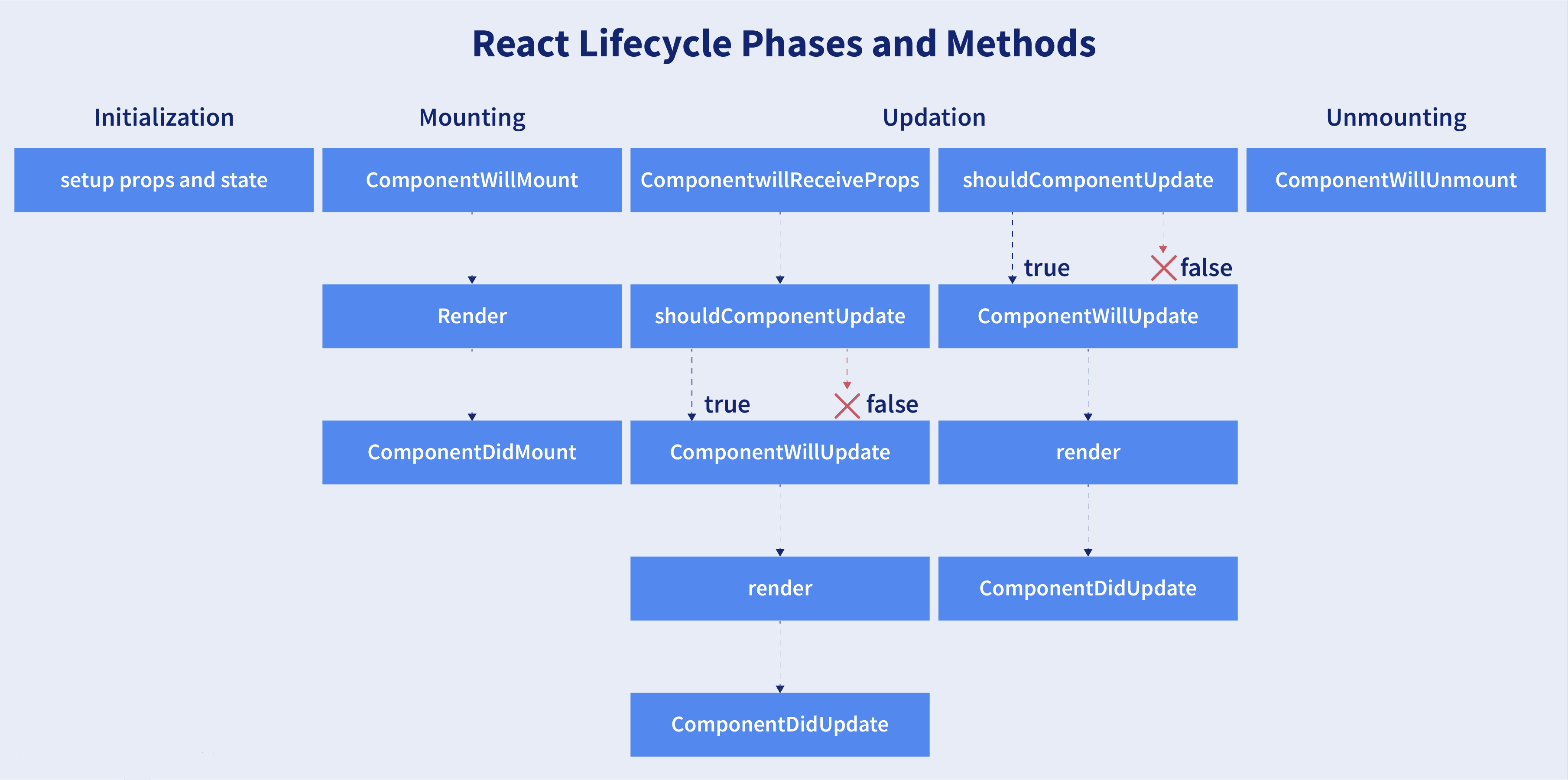
15. What are the different phases of the component lifecycle?

There are four different phases in the lifecycle of React component. They are:
  • Initialization: During this phase, React component will prepare by setting up the default props and initial state for the upcoming tough journey.
  • Mounting: Mounting refers to putting the elements into the browser DOM. Since React uses VirtualDOM, the entire browser DOM which has been currently rendered would not be refreshed. This phase includes the lifecycle methods componentWillMount and componentDidMount.
  • Updating: In this phase, a component will be updated when there is a change in the state or props of a component. This phase will have lifecycle methods like componentWillUpdate, shouldComponentUpdate, render, and componentDidUpdate.
  • Unmounting: In this last phase of the component lifecycle, the component will be removed from the DOM or will be unmounted from the browser DOM. This phase will have the lifecycle method named componentWillUnmount.
Different Phases of Component Lifecycle

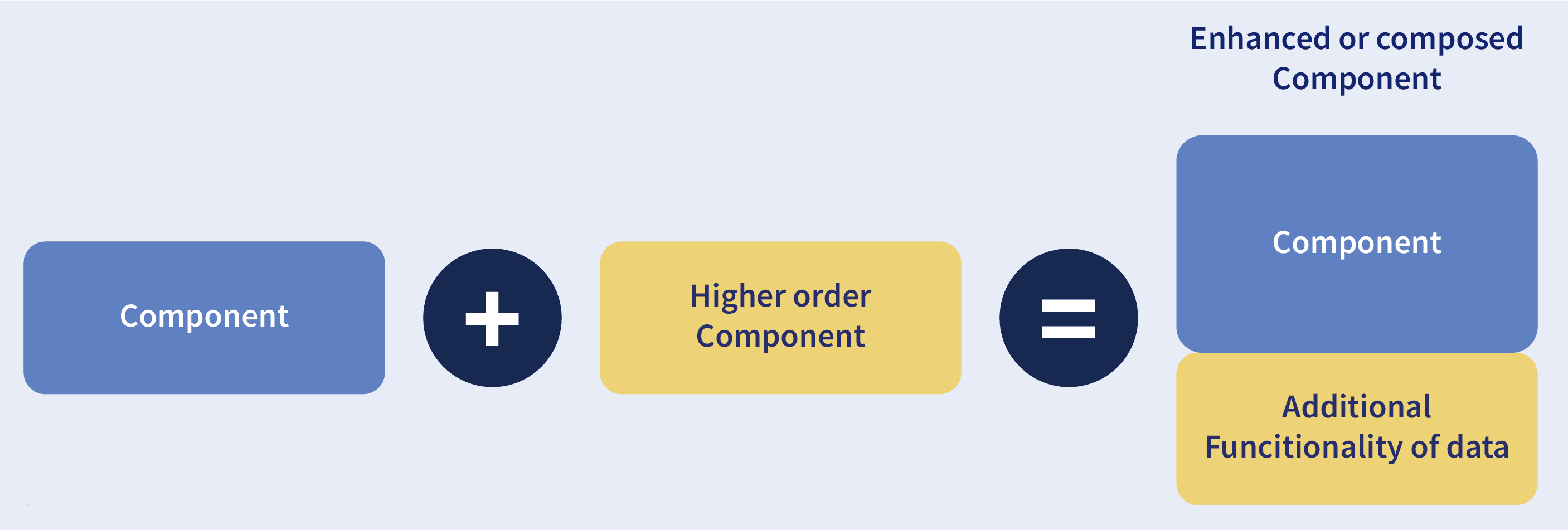
16. What are Higher Order Components?

Simply put, Higher-Order Component(HOC) is a function that takes in a component and returns a new component. 
Higher Order Components
When do we need a Higher Order Component?
While developing React applications, we might develop components that are quite similar to each other with minute differences. In most cases, developing similar components might not be an issue but, while developing larger applications we need to keep our code DRY, therefore, we want an abstraction that allows us to define this logic in a single place and share it across components. HOC allows us to create that abstraction.
Example of a HOC:
Consider the following components having similar functionality. The following component displays the list of articles:
// "GlobalDataSource" is some global data source
class ArticlesList extends React.Component {
 constructor(props) {
   super(props);
   this.handleChange = this.handleChange.bind(this);
   this.state = {
     articles: GlobalDataSource.getArticles(),
   };
 }
 componentDidMount() {
   // Listens to the changes added
   GlobalDataSource.addChangeListener(this.handleChange);
 }
 componentWillUnmount() {
   // Listens to the changes removed
   GlobalDataSource.removeChangeListener(this.handleChange);
 }
 handleChange() {
   // States gets Update whenver data source changes
   this.setState({
     articles: GlobalDataSource.getArticles(),
   });
 }
 render() {
   return (
     <div>
       {this.state.articles.map((article) => (
         <ArticleData article={article} key={article.id} />
       ))}
     </div>
   );
 }
}
The following component displays the list of users:
// "GlobalDataSource" is some global data source
class UsersList extends React.Component {
 constructor(props) {
   super(props);
   this.handleChange = this.handleChange.bind(this);
   this.state = {
     users: GlobalDataSource.getUsers(),
   };
 }
 componentDidMount() {
   // Listens to the changes added
   GlobalDataSource.addChangeListener(this.handleChange);
 }
 componentWillUnmount() {
   // Listens to the changes removed
   GlobalDataSource.removeChangeListener(this.handleChange);
 }
 handleChange() {
   // States gets Update whenver data source changes
   this.setState({
     users: GlobalDataSource.getUsers(),
   });
 }
 render() {
   return (
     <div>
       {this.state.users.map((user) => (
         <UserData user={user} key={user.id} />
       ))}
     </div>
   );
 }
}
Notice the above components, both have similar functionality but, they are calling different methods to an API endpoint.
Let’s create a Higher Order Component to create an abstraction:
// Higher Order Component which takes a component
// as input and returns another component
// "GlobalDataSource" is some global data source
function HOC(WrappedComponent, selectData) {
 return class extends React.Component {
   constructor(props) {
     super(props);
     this.handleChange = this.handleChange.bind(this);
     this.state = {
       data: selectData(GlobalDataSource, props),
     };
   }
   componentDidMount() {
     // Listens to the changes added
     GlobalDataSource.addChangeListener(this.handleChange);
   }
   componentWillUnmount() {
     // Listens to the changes removed
     GlobalDataSource.removeChangeListener(this.handleChange);
   }
   handleChange() {
     this.setState({
       data: selectData(GlobalDataSource, this.props),
     });
   }
   render() {
     // Rendering the wrapped component with the latest data data
     return <WrappedComponent data={this.state.data} {...this.props} />;
   }
 };
}
We know HOC is a function that takes in a component and returns a component.
In the code above, we have created a function called HOC which returns a component and performs functionality that can be shared across both the ArticlesList component and UsersList Component.
The second parameter in the HOC function is the function that calls the method on the API endpoint.
We have reduced the duplicated code of the componentDidUpdate and componentDidMount functions.
Using the concept of Higher-Order Components, we can now render the ArticlesList and UsersList components in the following way:
const ArticlesListWithHOC = HOC(ArticlesList, (GlobalDataSource) => GlobalDataSource.getArticles());
const UsersListWithHOC = HOC(UsersList, (GlobalDataSource) => GlobalDataSource.getUsers());
Remember, we are not trying to change the functionality of each component, we are trying to share a single functionality across multiple components using HOC. 

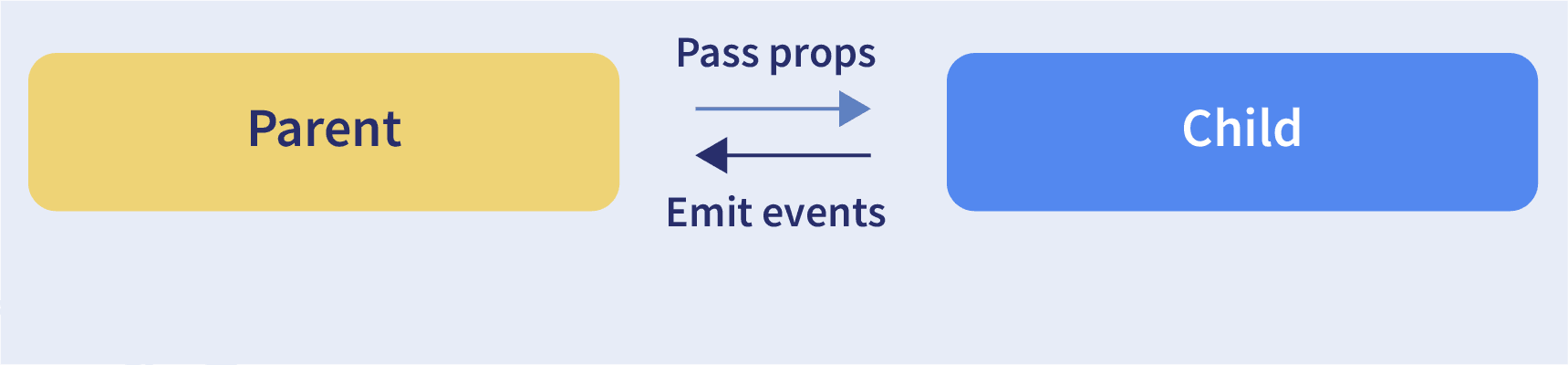
17. How to pass data between react components?

Pass data between React components
Parent Component to Child Component (using props)
With the help of props, we can send data from a parent to a child component.
How do we do this?
Consider the following Parent Component:
import ChildComponent from "./Child";
function ParentComponent(props) {
  let [counter, setCounter] = useState(0);

  let increment = () => setCounter(++counter);

  return (
    <div>
      <button onClick={increment}>Increment Counter</button>
      <ChildComponent counterValue={counter} />
    </div>
  );
}
As one can see in the code above, we are rendering the child component inside the parent component, by providing a prop called counterValue. The value of the counter is being passed from the parent to the child component.
We can use the data passed by the parent component in the following way:
function ChildComponent(props) {
  return (
    <div>
      <h5>Value of counter: {props.counterValue}</h5>
    </div>
  );
}
We use the props.counterValue to display the data passed on by the parent component.
Child Component to Parent Component (using callbacks)
This one is a bit tricky. We follow the steps below:
  • Create a callback in the parent component which takes in the data needed as a parameter.
  • Pass this callback as a prop to the child component.
  • Send data from the child component using the callback.
We are considering the same example above but in this case, we are going to pass the updated counterValue from child to parent.
Step1 and Step2:
Create a callback in the parent component, pass this callback as a prop.
function ParentComponent(props) {
  let [counter, setCounter] = useState(0);
  let callback = valueFromChild => setCounter(valueFromChild);
  return (
    <div>
      <h5>Value of counter: {counter}</h5>
      <ChildComponent callbackFunc={callback} counterValue={counter} />
    </div>
  );
}
As one can see in the code above, we created a function called callback which takes in the data received from the child component as a parameter.
Next, we passed the function callback as a prop to the child component.
Step3:
Pass data from the child to the parent component.
function ChildComponent(props) {
  let childCounterValue = props.counterValue;
  return (
    <div>
      <button onClick={() => props.callbackFunc(++childCounterValue)}>
        Increment Counter
      </button>
    </div>
  );
}
In the code above, we have used the props.counterValue and set it to a variable called childCounterValue.
Next, on button click, we pass the incremented childCounterValue to the props.callbackFunc.
This way, we can pass data from the child to the parent component.

18. Name a few techniques to optimize React app performance?

There are many ways through which one can optimize the performance of a React app, let’s have a look at some of them:
  • Using useMemo()
    • It is a React hook that is used for caching CPU-Expensive functions.
    • Sometimes in a React app, a CPU-Expensive function gets called repeatedly due to re-renders of a component, which can lead to slow rendering.
      useMemo( ) hook can be used to cache such functions. By using useMemo( ), the CPU-Expensive function gets called only when it is needed.
  • Using React.PureComponent -
    • It is a base component class that checks the state and props of a component to know whether the component should be updated.
    • Instead of using the simple React.Component, we can use React.PureComponent to reduce the re-renders of a component unnecessarily.
  • Maintaining State Colocation -
    • This is a process of moving the state as close to where you need it as possible.
    • Sometimes in React app, we have a lot of unnecessary states inside the parent component which makes the code less readable and harder to maintain. Not to forget, having many states inside a single component leads to unnecessary re-renders for the component.
    • It is better to shift states which are less valuable to the parent component, to a separate component.
  • Lazy Loading -
    • It is a technique used to reduce the load time of a React app. Lazy loading helps reduce the risk of web app performances to a minimum.

19. What are the different ways to style a React component?

There are many different ways through which one can style a React component. Some of the ways are :
  • Inline Styling: We can directly style an element using inline style attributes. Make sure the value of style is a JavaScript object:
class RandomComponent extends React.Component {
 render() {
   return (
     <div>
       <h3 style={{ color: "Yellow" }}>This is a heading</h3>
       <h5 style={{ fontSize: "32px" }}>This is a paragraph</h5>
     </div>
   );
 }
}
  • Using JavaScript object: We can create a separate JavaScript object and set the desired style properties. This object can be used as the value of the inline style attribute.
class RandomComponent extends React.Component {
 paragraphStyles = {
   color: "Red",
   fontSize: "32px"
 };

 headingStyles = {
   color: "blue",
   fontSize: "48px"
 };

 render() {
   return (
     <div>
       <h3 style={this.headingStyles}>This is a heading</h3>
       <h5 style={this.paragraphStyles}>This is a paragraph</h5>
     </div>
   );
 }
}
  • CSS Stylesheet: We can create a separate CSS file and write all the styles for the component inside that file. This file needs to be imported inside the component file.
import './RandomComponent.css';

class RandomComponent extends React.Component {
 render() {
   return (
     <div>
       <h3 className="heading">This is a heading</h3>
       <h5 className="paragraph">This is a paragraph</h5>
     </div>
   );
 }
}
  • CSS Modules:We can create a separate CSS module and import this module inside our component. Create a file with “.module.css” extension, styles.module.css:
.paragraph{
 color:"red";
 border:1px solid black;
}
We can import this file inside the component and use it:
import styles from  './styles.module.css';

class RandomComponent extends React.Component {
 render() {
   return (
     <div>
       <h3 className="heading">This is a heading</h3>
       <h5 className={styles.paragraph} >This is a paragraph</h5>
     </div>
   );
 }
}

20. How to prevent re-renders in React?

  • Reason for re-renders in React:
    • Re-rendering of a component and its child components occur when props or the state of the component has been changed.
    • Re-rendering components that are not updated, affects the performance of an application.
  • How to prevent re-rendering:
Consider the following components:
class Parent extends React.Component {
state = { messageDisplayed: false };
componentDidMount() {
  this.setState({ messageDisplayed: true });
}
render() {
  console.log("Parent is getting rendered");
  return (
    <div className="App">
      <Message />
    </div>
  );
}
}
class Message extends React.Component {
constructor(props) {
  super(props);
  this.state = { message: "Hello, this is vivek" };
}  
render() {
  console.log("Message is getting rendered");
  return (
    <div>
      <h5>{this.state.message}</h5>
    </div>
  );
}
}
  • The Parent component is the parent component and the Message is the child component. Any change in the parent component will lead to re-rendering of the child component as well. To prevent the re-rendering of child components, we use the shouldComponentUpdate() method:
**Note- Use shouldComponentUpdate( ) method only when you are sure that it’s a static component.
class Message extends React.Component {
constructor(props) {
  super(props);
  this.state = { message: "Hello, this is vivek" };
}
shouldComponentUpdate() {
  console.log("Does not get rendered");
  return false;
}
render() {
  console.log("Message is getting rendered");
  return (
    <div>
      <h5>{this.state.message}</h5>
    </div>
  );
}
}
As one can see in the code above, we have returned false from the shouldComponentUpdate() method, which prevents the child component from re-rendering.

21. Explain Strict Mode in React?

StrictMode is a tool added in version 16.3 of React to highlight potential problems in an application. It performs additional checks on the application.
function App() {
 return (
   <React.StrictMode>
     <div classname="App">
       <Header/>
       <div>
         Page Content
       </div>
       <Footer/>
     </div>
   </React.StrictMode>
 );
}
To enable StrictMode, <React.StrictMode> tags need to be added inside the application:
import React from "react";
import ReactDOM from "react-dom";
import App from "./App";
const rootElement = document.getElementById("root");
ReactDOM.render(
<React.StrictMode>
  <App />
</React.StrictMode>,
rootElement
);
StrictMode currently helps with the following issues:
  • Identifying components with unsafe lifecycle methods:
    • Certain lifecycle methods are unsafe to use in asynchronous react applications. With the use of third-party libraries, it becomes difficult to ensure that certain lifecycle methods are not used.
    • StrictMode helps in providing us with a warning if any of the class components use an unsafe lifecycle method.
  • Warning about the usage of legacy string API:
    • If one is using an older version of React, callback ref is the recommended way to manage refs instead of using the string refs. StrictMode gives a warning if we are using string refs to manage refs.
  • Warning about the usage of findDOMNode:
    • Previously, findDOMNode( ) method was used to search the tree of a DOM node. This method is deprecated in React. Hence, the StrictMode gives us a warning about the usage of this method.
  • Warning about the usage of legacy context API (because the API is error-prone).

React MCQ Questions

1. _______ is a necessary API for every React.js component.

2. React is mainly used for developing ______.

3. The Keys given to a list of elements in React should be ______.

4. The number of elements that can be returned by a valid React component is ______.

5. What are the ReactJS limitations?

6. What function will permit for rendering the React content in an HTML page?

7. What is meant by the state in React?

8. What is React or ReactJS?

9. What is the declarative approach for rendering a dynamic list of components depending on array values?

10. What is the usage of setState?

11. What is used for passing the data to a component from outside?

12. Which command can be used for the creation of React app?

13. Which of the following comes under the advantages of React?

14. Which of the following statements related to the “webpack” command is true?

15. ______ will help to keep the data unidirectional in React.