Beginner Node.js Interview Questions

1. What is Node.js and how it works?

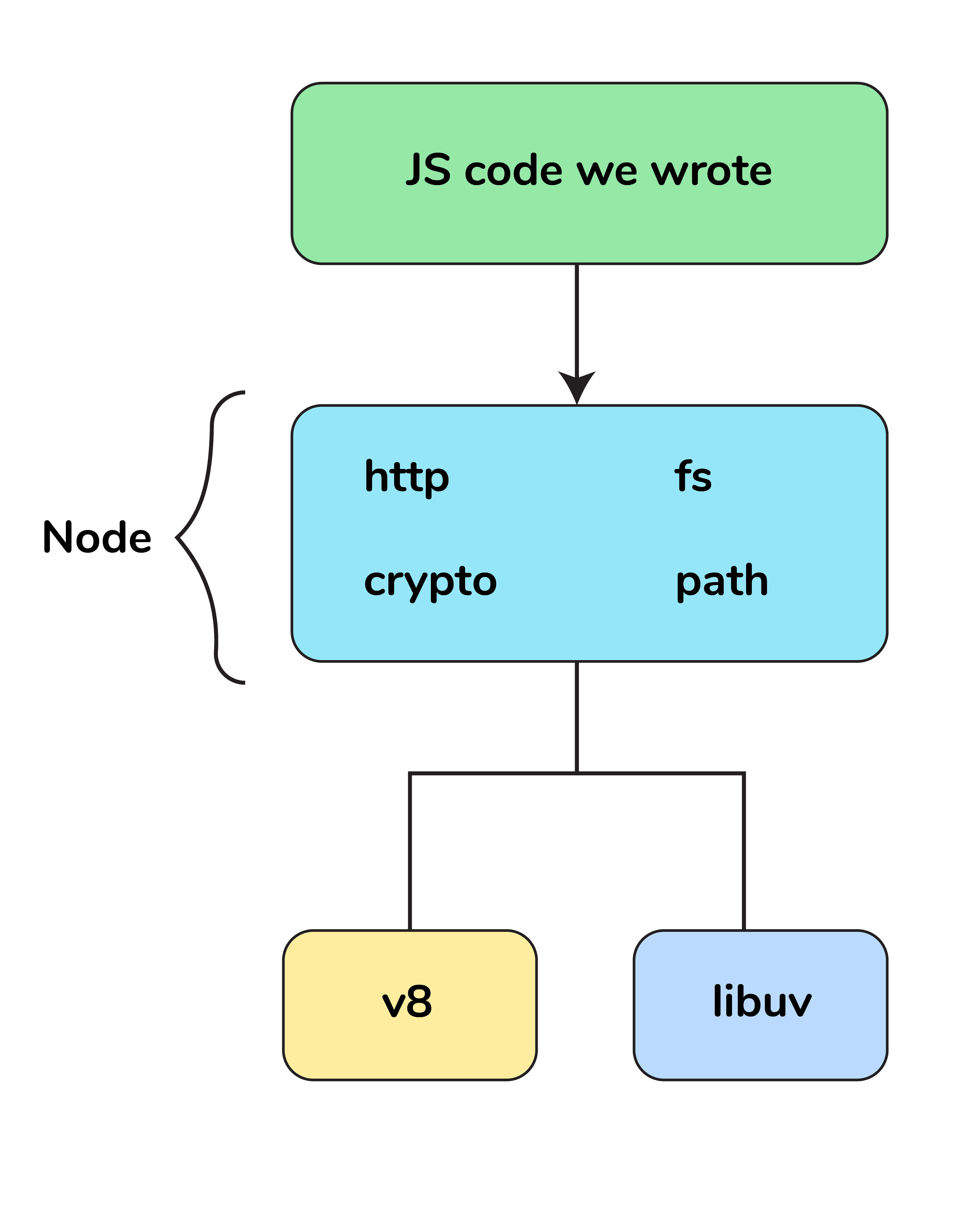
Node.js is a virtual machine that uses JavaScript as its scripting language and runs Chrome’s V8 JavaScript engine. Basically, Node.js is based on an event-driven architecture where I/O runs asynchronously making it lightweight and efficient. It is being used in developing desktop applications as well with a popular framework called Electron as it provides API to access OS-level features such as file system, network, etc.

Here is a Free course on Node.js for beginners to master the fundamentals of Node.js.

2. What tools can be used to assure consistent code style?

ESLint can be used with any IDE to ensure a consistent coding style which further helps in maintaining the codebase.

3. What is a first class function in Javascript?

When functions can be treated like any other variable then those functions are first-class functions. There are many other programming languages, for example, Scala, Haskell, etc. which follow this including JavaScript. Now, because of this, a function can be passed as a parameter to another function (callback) or a function can return another function (higher-order function). map() and filter() are higher-order functions that are popularly used.

4. How do you manage packages in your node.js project?

It can be managed by a number of package installers and their configuration file accordingly. Out of them, the most commonly used are npm and yarn. Both provide almost all libraries of JavaScript with extended features for controlling environment-specific configurations. To maintain versions of libraries installed in a project we use package.json and package-lock.json so that there is no issue in porting that app to a different environment.

5. How is Node.js better than other frameworks most popularly used?

  • Node.js provides simplicity in development because its non-blocking I/O and event-based model result in short response times and concurrent processing, unlike other frameworks where developers have to use thread management.
  • It runs on the Chrome V8 engine, which is written in C++ and is highly performant with constant improvements.
  • Since JavaScript is used in both the frontend and backend, development becomes much faster.
  • There are ample libraries available, so developers don’t need to reinvent the wheel.

6. Explain the steps how “Control Flow” controls the functions calls?

  • Control the order of execution
  • Collect data
  • Limit concurrency
  • Call the following step in the program

7. What are some commonly used timing features of Node.js?

  • setTimeout / clearTimeout – Used to implement delays in code execution.
  • setInterval / clearInterval – Used to run a code block repeatedly at specified intervals.
  • setImmediate / clearImmediate – Executes a callback function on the next iteration of the event loop.
  • process.nextTick – Similar to setImmediate but preferred when the callback needs to run with higher urgency.

8. What are the advantages of using promises instead of callbacks?

The main advantage of using Promise is that you get an object to decide the action that needs to be taken after the asynchronous task completes. This makes code more manageable and helps avoid callback hell.

9. What is fork in node JS?

A fork in general is used to spawn child processes. In Node.js, it is used to create a new instance of the V8 engine to run multiple workers that execute code in parallel.

10. Why is Node.js single-threaded?

Node.js was created explicitly as an experiment in asynchronous processing. The goal was to test a new theory of doing async processing on a single thread instead of relying on the traditional thread-based implementation of scaling used by other frameworks.

11. How do you create a simple server in Node.js that returns Hello World?

var http = require("http");

http.createServer(function (request, response) {
  response.writeHead(200, { 'Content-Type': 'text/plain' });
  response.end('Hello World\n');
}).listen(3000);

12. How many types of API functions are there in Node.js?

There are two types of API functions:

  • Asynchronous, non-blocking functions — Mostly I/O operations which can be forked out of the main loop.
  • Synchronous, blocking functions — Mostly operations that directly influence the process running in the main loop.

13. What is REPL?

REPL in Node.js stands for Read, Eval, Print, and Loop, which means evaluating code on the go.

14. List down the two arguments that async.queue takes as input?

  • Task Function
  • Concurrency Value

15. What is the purpose of module.exports?

This is used to expose functions of a particular module or file to be used elsewhere in the project. This can be used to encapsulate all similar functions in a file which further improves the project structure.

For example, you may have a file containing all utility functions with solutions in different programming languages:

const getSolutionInJavaScript = async ({ problem_id }) => {
  ...
};

const getSolutionInPython = async ({ problem_id }) => {
  ...
};

module.exports = { getSolutionInJavaScript, getSolutionInPython };

You can then import and use these functions in another file like this:

const { getSolutionInJavaScript, getSolutionInPython } = require("./utils");

Intermediate Node.js Interview Questions

1. Explain the concept of stub in Node.js?

Stubs are used in writing tests which are an important part of development. A stub replaces the whole function being tested.

They are helpful in scenarios such as:

  • External calls which make tests slow and difficult to write (e.g. HTTP calls/DB calls)
  • Triggering different outcomes for a piece of code (e.g. simulating errors vs. success responses)

Example Function:

const request = require('request');

const getPhotosByAlbumId = (id) => {
  const requestUrl = `https://jsonplaceholder.typicode.com/albums/${id}/photos?_limit=3`;

  return new Promise((resolve, reject) => {
    request.get(requestUrl, (err, res, body) => {
      if (err) {
        return reject(err);
      }
      resolve(JSON.parse(body));
    });
  });
};

module.exports = getPhotosByAlbumId;

Example Test with Stub:

const expect = require('chai').expect;
const request = require('request');
const sinon = require('sinon');
const getPhotosByAlbumId = require('./index');

describe('with Stub: getPhotosByAlbumId', () => {
  before(() => {
    sinon.stub(request, 'get')
      .yields(null, null, JSON.stringify([
        { albumId: 1, id: 1, title: "A real photo 1", url: "https://via.placeholder.com/600/92c952", thumbnailUrl: "https://via.placeholder.com/150/92c952" },
        { albumId: 1, id: 2, title: "A real photo 2", url: "https://via.placeholder.com/600/771796", thumbnailUrl: "https://via.placeholder.com/150/771796" },
        { albumId: 1, id: 3, title: "A real photo 3", url: "https://via.placeholder.com/600/24f355", thumbnailUrl: "https://via.placeholder.com/150/24f355" }
      ]));
  });

  after(() => {
    request.get.restore();
  });

  it('should getPhotosByAlbumId', (done) => {
    getPhotosByAlbumId(1).then((photos) => {
      expect(photos.length).to.equal(3);
      photos.forEach(photo => {
        expect(photo).to.have.property('id');
        expect(photo).to.have.property('title');
        expect(photo).to.have.property('url');
      });
      done();
    });
  });
});

2. Describe the exit codes of Node.js?

Exit codes give us an idea of how a process got terminated and the reason behind termination.

A few of them are:

  • 0 – Success, process completed without errors.
  • 1 – Uncaught Fatal Exception (application error).
  • 5 – Fatal error in V8 (JavaScript engine).
  • 9 – Invalid argument.
  • 128 + signal – Process terminated due to signal (e.g., 137 means killed with SIGKILL).

3. For Node.js, why Google uses V8 engine?

Well, are there any other options available? Yes, of course, we have Spidermonkey from Firefox, Chakra from Edge but Google’s V8 is the most evolved (since it’s open-source so there’s a huge community helping in developing features and fixing bugs) and fastest (since it’s written in C++) we got till now as a JavaScript and WebAssembly engine. And it is portable to almost every machine known.

4. Why should you separate Express app and server?

The server is responsible for initializing the routes, middleware, and other application logic whereas the app has all the business logic which will be served by the routes initiated by the server. This ensures that the business logic is encapsulated and decoupled from the application logic which makes the project more readable and maintainable.

5. Explain what a Reactor Pattern in Node.js?

The Reactor Pattern is a design pattern used for non-blocking I/O operations. More generally, it is the foundation of many event-driven architectures.

It consists of two main components:

  • Reactor: Responsible for dispatching I/O events to the appropriate handlers.
  • Handler: Executes the actual work required for those events.

This separation of responsibilities makes the system scalable and efficient, especially under high loads.

6. What is middleware?

Middleware comes in between your request and business logic. It is mainly used to capture logs and enable rate limit, routing, authentication, basically whatever that is not a part of business logic. There are third-party middleware also such as body-parser and you can write your own middleware for a specific use case.

7. What are node.js buffers?

In general, buffers is a temporary memory that is mainly used by stream to hold on to some data until consumed. Buffers are introduced with additional use cases than JavaScript’s Uint8Array and are mainly used to represent a fixed-length sequence of bytes. This also supports legacy encodings like ASCII, UTF-8, etc. It is a fixed (non-resizable) allocated memory outside the V8.

8. What is node.js streams?

Streams in Node.js

Streams are instances of EventEmitter that allow working with streaming data in Node.js. They are useful when handling and manipulating large files such as videos, audio, or other large datasets over a network.
Internally, streams use buffers as temporary storage.

There are mainly four types of streams:

  • Writable: Streams to which data can be written ( e.g., fs.createWriteStream()).
  • Readable: Streams from which data can be read ( e.g., fs.createReadStream()).
  • Duplex: Streams that are both readable and writable (e.g., net.Socket).
  • Transform: Duplex streams that can modify or transform data as it is written and read (e.g., zlib.createDeflate()).

9. How can we use async await in node.js?

Here is an example of using async-await pattern:

// this code is to retry with exponential backoff
function wait(timeout) {
  return new Promise((resolve) => {
    setTimeout(() => {
      resolve();
    }, timeout);
  });
}

async function requestWithRetry(url) {
  const MAX_RETRIES = 10;
  for (let i = 0; i <= MAX_RETRIES; i++) {
    try {
      return await request(url);
    } catch (err) {
      const timeout = Math.pow(2, i);
      console.log('Waiting', timeout, 'ms');
      await wait(timeout);
      console.log('Retrying', err.message, i);
    }
  }
}

10. How does Node.js overcome the problem of blocking of I/O operations?

Since Node has an event loop that can be used to handle all the I/O operations in an asynchronous manner without blocking the main function.

So for example, if some network call needs to happen it will be scheduled in the event loop instead of the main thread (single thread). And if there are multiple such I/O calls each one will be queued accordingly to be executed separately (other than the main thread).

Thus even though we have single-threaded JS, I/O ops are handled in a non-blocking way.

11. Differentiate between process.nextTick() and setImmediate()?

Both can be used to switch to an asynchronous mode of operation by listener functions.

process.nextTick() sets the callback to execute but setImmediate() pushes the callback in the queue to be executed. So the event loop runs in the following manner:

timers → pending callbacks → idle, prepare → connections (poll, data, etc) → check → close callbacks

In this, the process.nextTick() method adds the callback function to the start of the next event queue, while setImmediate() places the function in the check phase of the next event queue.

12. If Node.js is single threaded then how does it handle concurrency?

The main loop is single-threaded and all async calls are managed by the libuv library.

For example:

const crypto = require("crypto");
const start = Date.now();

function logHashTime() {
  crypto.pbkdf2("a", "b", 100000, 512, "sha512", () => {
    console.log("Hash: ", Date.now() - start);
  });
}

logHashTime();
logHashTime();
logHashTime();
logHashTime();

This gives the output:

Hash: 1213
Hash: 1225
Hash: 1212
Hash: 1222

This is because libuv sets up a thread pool to handle such concurrency. How many threads will be there in the thread pool depends upon the number of cores, but you can override this.

13. What is an event-loop in Node JS?

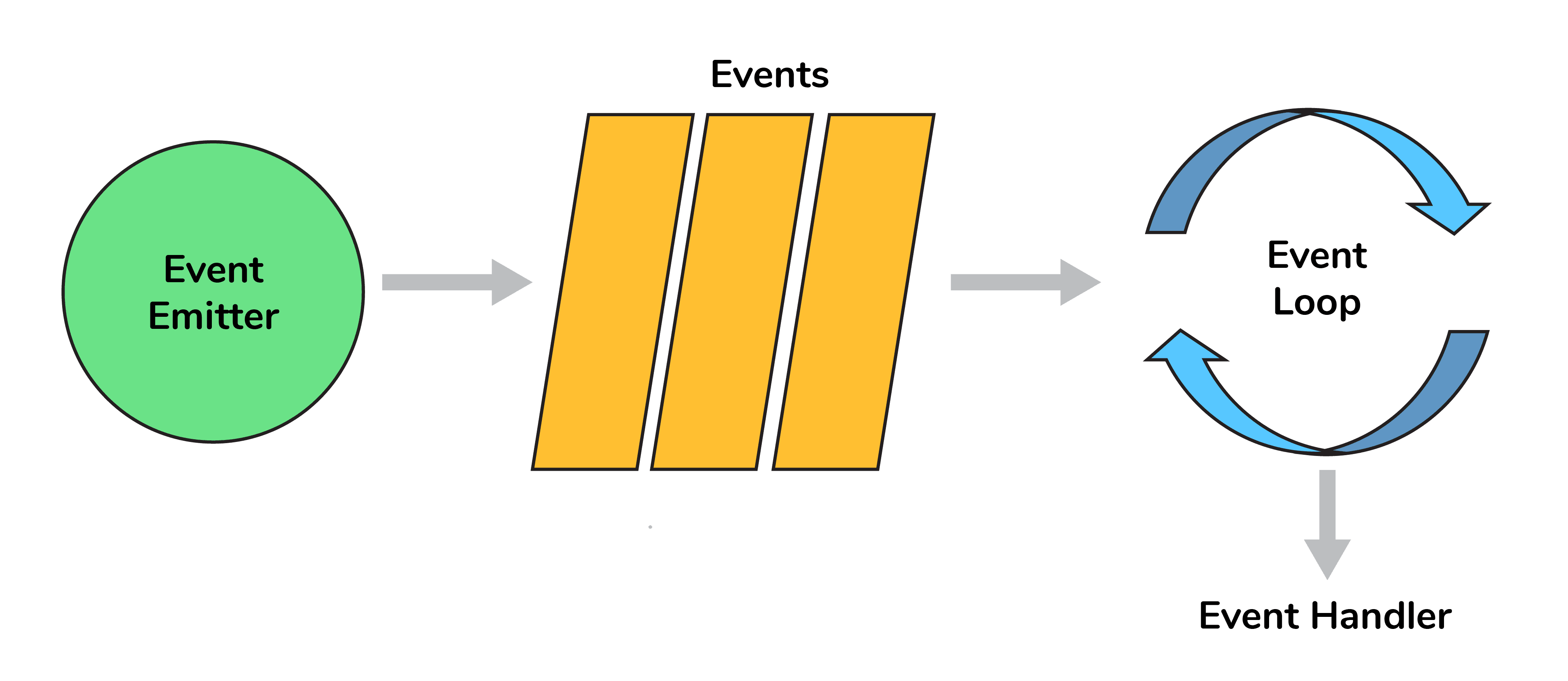
Whatever that is async is managed by the event loop using a queue and listener. We can get the idea using the following diagram:

Node.js Event Loop
Node.js Event Loop

So when an async function needs to be executed (or I/O), the main thread sends it to a different thread allowing V8 to keep executing the main code. The event loop involves different phases with specific tasks such as timers, pending callbacks, idle or prepare, poll, check, and close callbacks with different FIFO queues. Also, in between iterations it checks for async I/O or timers and shuts down cleanly if there aren't any.

14. What do you understand by callback hell?

async_A(function(){
   async_B(function(){
       async_C(function(){
           async_D(function(){
               ....
           });
       });
   });
});

For the above example, we are passing callback functions and it makes the code unreadable and not maintainable, thus we should change the async logic to avoid this.

Advanced Node.js Interview Questions

1. What is an Event Emitter in Node.js?

EventEmitter is a Node.js class that includes all the objects that are capable of emitting events. This can be done by attaching named events that are emitted by the object using an eventEmitter.on() function. Thus, whenever this object throws an event, the attached functions are invoked synchronously.

const EventEmitter = require('events');

class MyEmitter extends EventEmitter {}

const myEmitter = new MyEmitter();

myEmitter.on('event', () => {
  console.log('an event occurred!');
});

myEmitter.emit('event');

2. Enhancing Node.js performance through clustering.

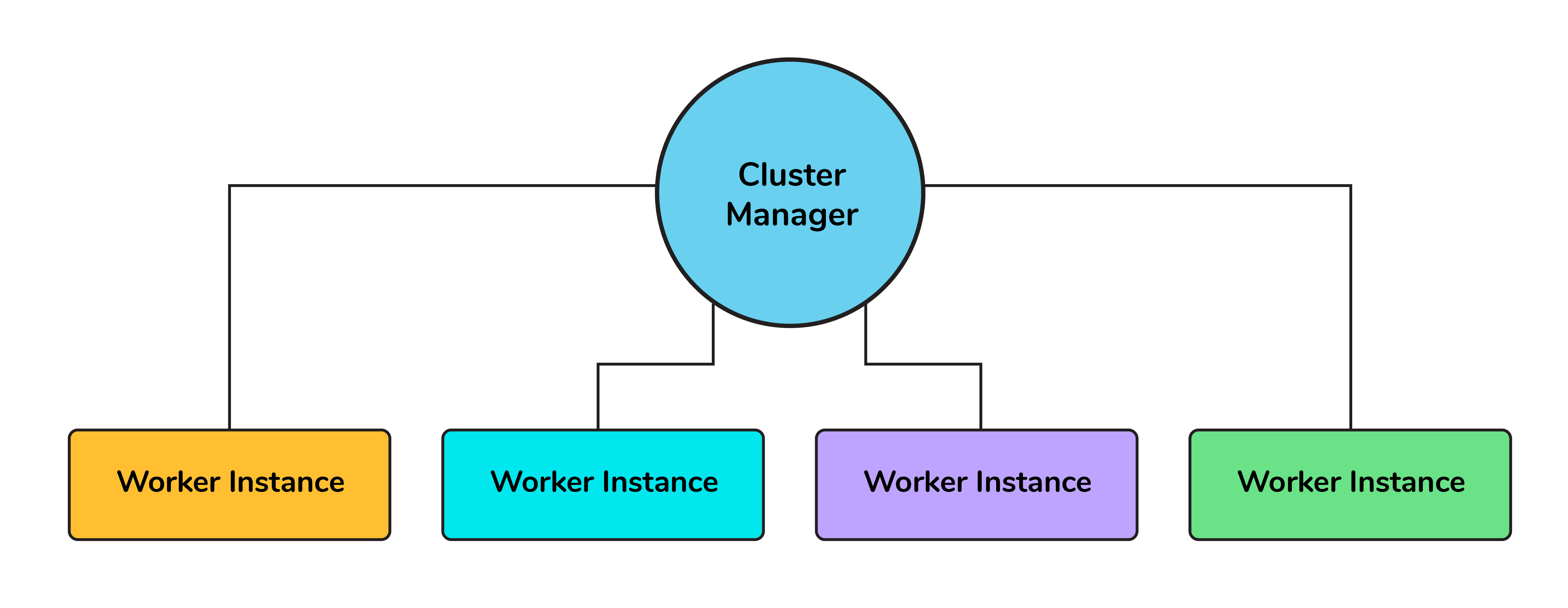
Node.js applications run on a single processor, which means that by default they don’t take advantage of a multiple-core system. Cluster mode is used to start up multiple Node.js processes, thereby having multiple instances of the event loop. When we start using cluster in a Node.js app, behind the scene multiple Node.js processes are created, but there is also a parent process called the cluster manager which is responsible for monitoring the health of the individual instances of our application.

Clustering in Node.js

3. What is a thread pool and which library handles it in Node.js

The Thread pool is handled by the libuv library. libuv is a multi-platform C library that provides support for asynchronous I/O-based operations such as file systems, networking, and concurrency.

Thread Pool
Thread Pool

4. What is WASI and why is it being introduced?

WebAssembly provides an implementation of the WebAssembly System Interface specification through the WASI API in Node.js implemented using the WASI class. The introduction of WASI was done with the idea that it is possible to use the underlying operating system via a collection of POSIX-like functions, thus enabling applications to use resources more efficiently and access features that require system-level access.

5. How are worker threads different from clusters?

Cluster:

  • There is one process on each CPU with an IPC to communicate.
  • In case we want to have multiple servers accepting HTTP requests via a single port, clusters can be helpful.
  • The processes are spawned in each CPU thus will have separate memory and Node instance which further will lead to memory issues.

Worker threads:

  • There is only one process in total with multiple threads.
  • Each thread has one Node instance (one event loop, one JS engine) with most of the APIs accessible.
  • Shares memory with other threads (e.g. SharedArrayBuffer).
  • This can be used for CPU-intensive tasks like processing data or accessing the file system since Node.js is single-threaded, synchronous tasks can be made more efficient leveraging the worker's threads.

6. How to measure the duration of async operations?

Performance API provides us with tools to figure out the necessary performance metrics. A simple example would be using async_hooks and perf_hooks:

'use strict';
const async_hooks = require('async_hooks');
const { performance, PerformanceObserver } = require('perf_hooks');

const set = new Set();

const hook = async_hooks.createHook({
  init(id, type) {
    if (type === 'Timeout') {
      performance.mark(`Timeout-${id}-Init`);
      set.add(id);
    }
  },
  destroy(id) {
    if (set.has(id)) {
      set.delete(id);
      performance.mark(`Timeout-${id}-Destroy`);
      performance.measure(
        `Timeout-${id}`,
        `Timeout-${id}-Init`,
        `Timeout-${id}-Destroy`
      );
    }
  }
});

hook.enable();

const obs = new PerformanceObserver((list, observer) => {
  console.log(list.getEntries()[0]);
  performance.clearMarks();
  observer.disconnect();
});

obs.observe({ entryTypes: ['measure'], buffered: true });

setTimeout(() => {}, 1000);

This would give us the exact time it took to execute the callback.

7. How to measure the performance of async operations?

Performance API provides us with tools to figure out the necessary performance metrics.

A simple example would be:

const { PerformanceObserver, performance } = require('perf_hooks');
const obs = new PerformanceObserver((items) => {
 console.log(items.getEntries()[0].duration);
 performance.clearMarks();
});
obs.observe({ entryTypes: ['measure'] });
performance.measure('Start to Now');
performance.mark('A');
doSomeLongRunningProcess(() => {
 performance.measure('A to Now', 'A');
 performance.mark('B');
 performance.measure('A to B', 'A', 'B');
});

Additional Useful Resources

  1. NodeJS MCQ
  2. Top 10 Node JS Projects Ideas
  3. Node.js Vs React.js: What’s The Difference?
  4. Node.js Vs Django: Which One is Better For Web Development?

Node js MCQ

1. Which of the following are Node.js stream types?

2. Which module is used to serve static files in Node.js?

3. Which of the following statements is valid to import a module in file?

4. What is the use of underscore variable in REPL session?

5. What is the default scope of Node.js application?

6. What is the fullform of NPM?

7. How to check equality of two nodes?

8. How many Node object methods are available?

9. How to make node modules available externally?

10. Is Node multithreaded?