JavaScript Tutorial: Basics to Advanced Concepts

1. Document Object Model (DOM) in JavaScript.

The Document Object Model (DOM) is the structure of a webpage's code. There are many different ways to build and alter HTML elements with JavaScript (called nodes).

  • Node Properties:
    • attributes — Gets a live list of all the characteristics associated with an element.
    • baseURI — Returns an HTML element's absolute base URL.
    • childNodes — Returns a list of the child nodes of an element.
    • firstChild — Returns the element's first child node.
    • lastChild — An element's final child node.
    • nextSibling — Returns the next node in the same node tree level as the current node.
    • nodeName — Returns a node's name.
    • nodeType — Returns the node's type.
    • nodeValue — Sets or returns a node's value.
    • ownerDocument — This node's top-level document object.
    • parentNode — Returns the element's parent node.
    • previousSibling — Gets the node that comes before the current one.
    • textContent — Sets or returns a node's and its descendants' textual content.
  • Node Methods:
    • appendChild() — Adds a new child node as the last child node to an element.
    • cloneNode() — Duplicates an HTML element.
    • compareDocumentPosition() — Compares two elements' document positions.
    • getFeature() — Returns an object that implements the APIs of a feature.
    • hasAttributes() — Returns true if an element has any attributes; otherwise false.
    • hasChildNodes() — Returns true if an element has any child nodes.
    • insertBefore() — Adds a new child node before an existing child node.
    • isDefaultNamespace() — Returns true if a given namespaceURI is the default.
    • isEqualNode() — Determines whether two elements are the same.
    • isSameNode() — Checks if two references point to the same node.
    • isSupported() — Returns true if the element supports the provided feature.
    • lookupNamespaceURI() — Returns the namespace URI for a specific node.
    • lookupPrefix() — Returns the prefix string for a given namespace URI if present.
    • normalise() — Joins neighbouring text nodes and removes empty text nodes.
    • removeChild() — Removes a child node from an element.
    • replaceChild() — Replaces a child node in an element.
  • Element Methods:
    • getAttribute() — Returns the value of an element node's attribute.
    • getAttributeNS() — Returns the string value of an attribute with the namespace and name supplied.
    • getAttributeNode() — Returns the attribute node supplied.
    • getAttributeNodeNS() — Returns the attribute node for the specified namespace and name.
    • getElementsByTagName() — Returns a list of all child elements with the supplied tag name.
    • getElementsByTagNameNS() — Returns a live HTMLCollection of items in the provided namespace with a certain tag name.
    • hasAttribute() — Returns true if an element has any attributes.
    • hasAttributeNS() — Returns true/false depending on whether the element in a namespace has the supplied attribute.
    • removeAttribute() — Removes an element's supplied attribute.
    • removeAttributeNS() — Removes an attribute from an element in a specific namespace.
    • setAttributeNode() — Sets or modifies an attribute node.
    • setAttributeNodeNS() — Sets a new namespaced attribute node to an element.
2. ES5 Vs ES6: What is the Difference.

ECMAScript 5 (ES5): Because it was launched in 2009, ES5 is also known as ECMAScript 2009. It has functions where developers concentrate on how items are created. In ES5, you must use the function keyword and return to define the function, just as you would in any other JavaScript language.

ECMAScript 6 (ES6): Because it was launched in 2015, ES6 is also known as ECMAScript 2015. Its class allows developers to create an object with the new operator and an arrow function. They don't need to use the function keyword to define the function, and can also avoid using the return keyword.

The key differences between ES5 and ES6 are as shown below:

ES5ES6
Its year of release is 2009.Its year of release is 2015.
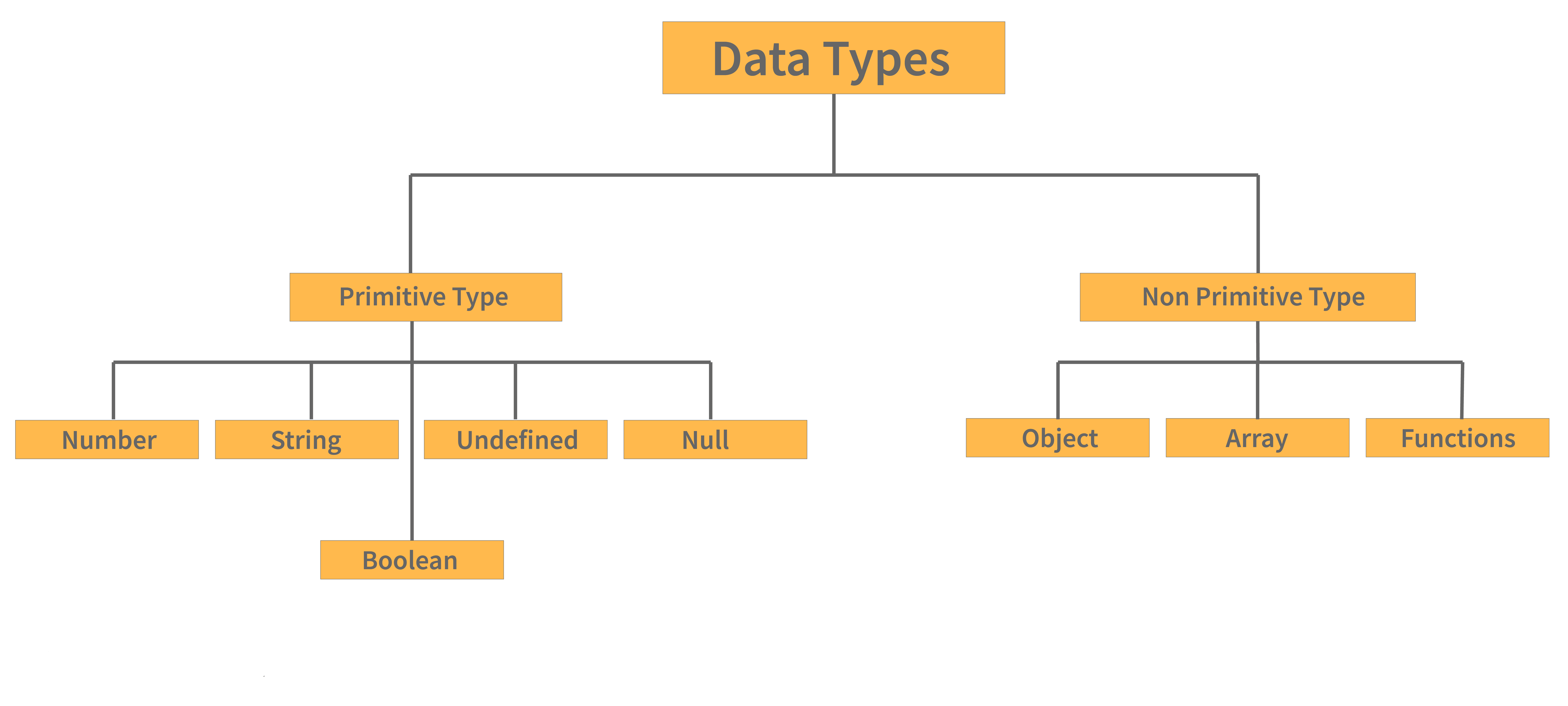
It accepts string, integer, boolean, null, and undefined primitive data types.Introduced the symbol data type for unique values.
Variables can be defined only with var.Introduced let and const.
Lower performance compared to ES6.Better performance compared to ES5.
Object manipulation takes longer.Object manipulation is faster.

Conclusion:

As a programming language, JavaScript is gaining popularity. Because of its proven track record and benefits, it is becoming the language of choice for developing web applications. JavaScript-based libraries like React, Angular, Nest, etc. are becoming popular due to their ease of use. This article highlights the basic differences between ES5 and ES6 and serves as a quick reference for beginners and experienced developers.

Useful Resources:

3. JavaScript Error Handling.

Various types of errors occur when we are coding in JavaScript. There are a few options for dealing with them:

  • try — We can define a code block for testing errors using the try block.
  • catch — We can set up a block of code to execute in the event of an error using the catch statement.
  • throw — Instead of the typical JavaScript errors, we can also create custom error messages using the throw statement.
  • finally — JavaScript also allows us to run our code regardless of the outcome of try and catch.

JavaScript possesses its own inbuilt error object which has the following properties:

  • name — Used for setting or returning an error name.
  • message — Used for setting or returning the error message as a string.

There are six types of ways in which the error property can return its name. They are as follows:

  • EvalError — Indicates that an error has occurred within the eval() method.
  • RangeError — Indicates that some number is “out of range”.
  • ReferenceError — Indicates that an illegal reference was made.
  • SyntaxError — Indicates that a syntax error occurred.
  • TypeError — Indicates that a type error occurred.
  • URIError — Indicates that an encodeURI() error occurred.

4. JavaScript Memory Allocation and Event Loop.

In JavaScript, memory allocation is done in the following regions:

  • Heap memory: Data is stored in random order and memory is allocated accordingly.
Heap memory
  • Stack memory: Memory that is allocated in stacks. The majority of the time, it's employed for functions.
Stack memory

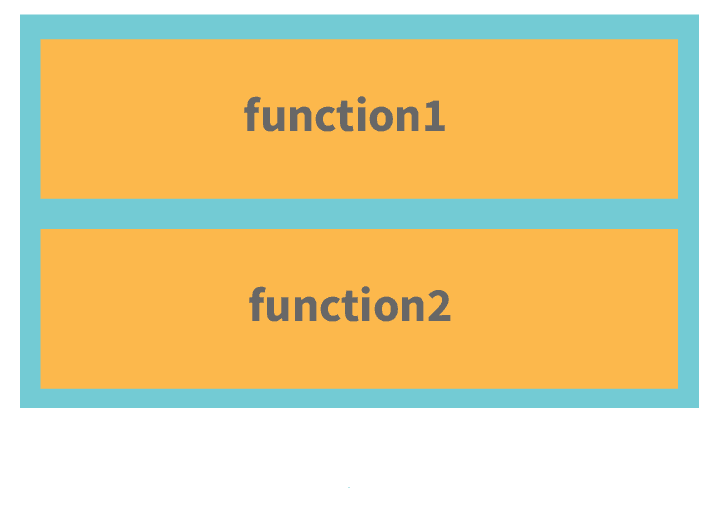
The function stack is a function that maintains track of all other functions that are running at the same time. An example to illustrate it is as follows:

function second() {
  console.log("Second")
}
function first() {
  second()
}
function foo() {
  first()
}
foo()

The order in which functions are executed (popped out of the stack once completed) is:

  1. console.log
  2. second
  3. first
  4. foo
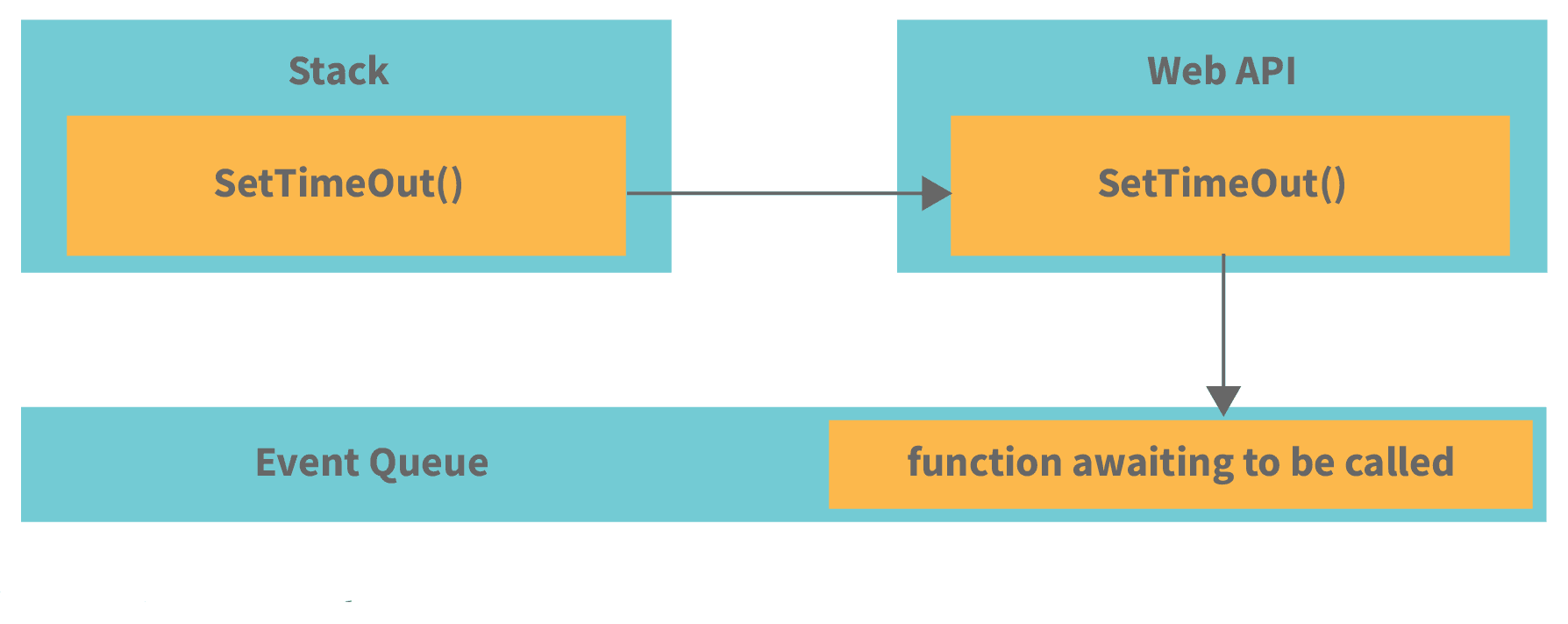
  • Event loop: An event loop pulls tasks like methods out of the queue and places them onto the function execution stack whenever the stack becomes empty. This is how JavaScript appears multithreaded, even though it is single-threaded.
Event Loop Illustration

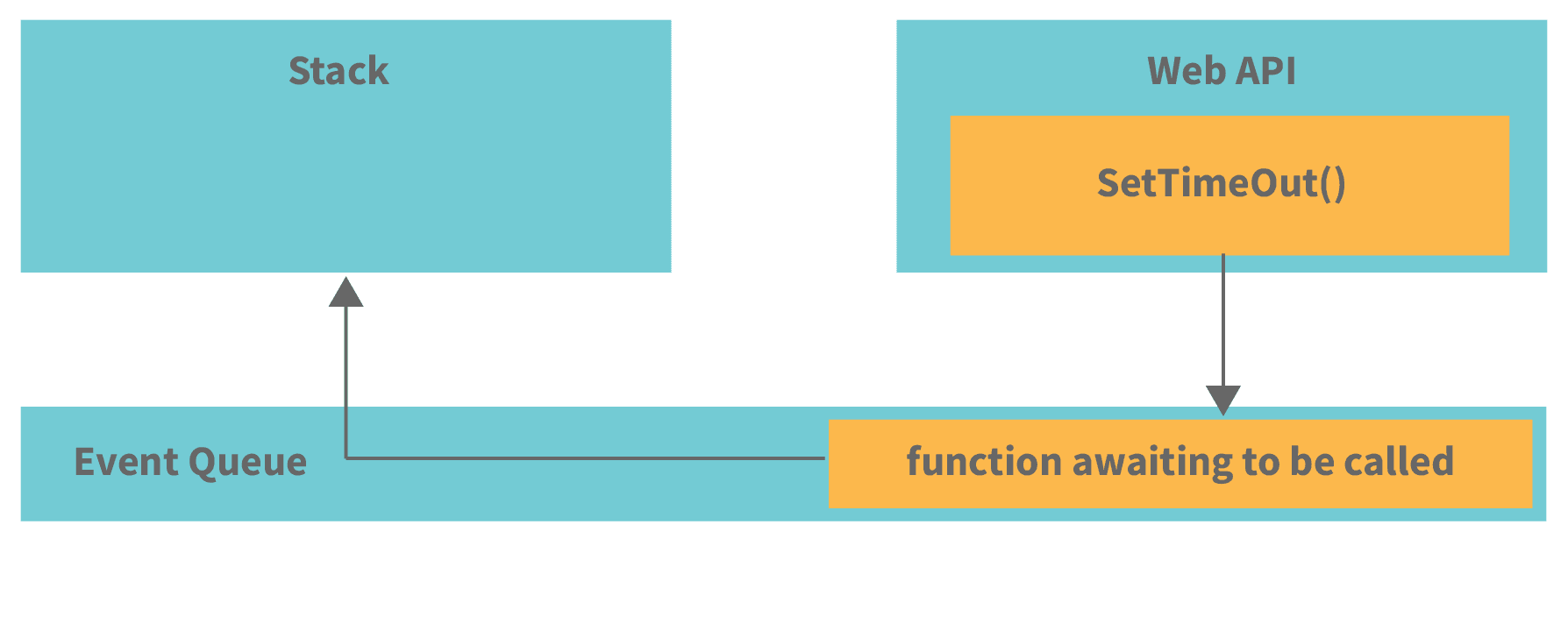
The callback function in the event queue waits until the stack is empty. For example, when setTimeout()is called, the Web API waits. Once the stack is empty, the callback is pushed in:

Event Loop with setTimeout

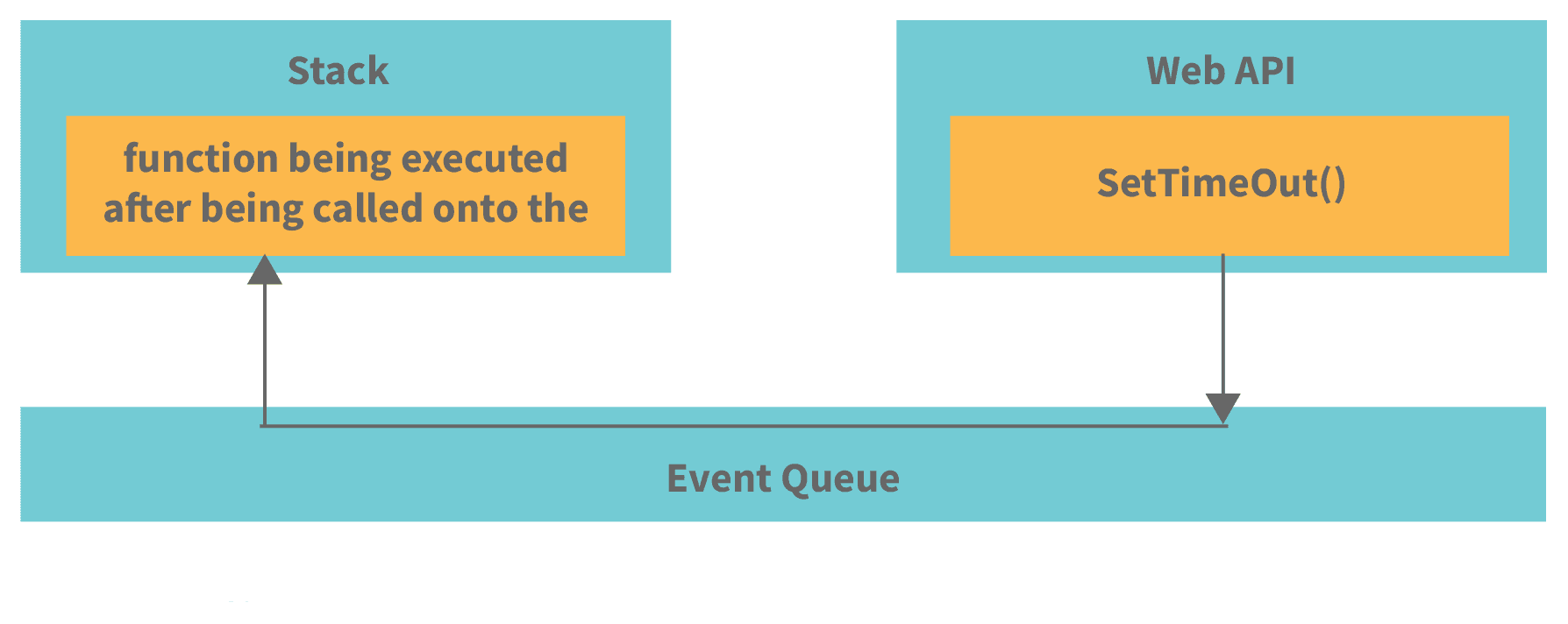
The event loop always takes the first event from the Event Queue and places it on the stack. In this case, it’s the callback function. If this function calls other functions, they will also follow the same stack process:

Event Queue Example

5. Asynchronous JavaScript.

A number of Web API features now use asynchronous code for running, especially those that access or fetch a resource from external devices, for instance, retrieving files from the network, accessing some database and returning data to it, accessing a video stream from a webcam, or broadcasting the display to a VR headset.

There are two ways in which asynchronous coding can be done in JavaScript:

  • Async Callbacks: When invoking a function, async callbacks are functions that are passed as arguments and begin executing code in the background. When the background code is finished, it runs the callback function to notify you that the work is complete or that anything interesting has occurred.

Callbacks are a little out of date these days, but they're still used in older yet popular APIs. For example, the addEventListener() method:

button.addEventListener('click', () => {
  alert('Button has been clicked!');
  let paraElement = document.createElement('p');
  paraElement.textContent = 'A new paragraph.';
  document.body.appendChild(paraElement);
});

The first parameter specifies the event type, while the second is a callback function executed when the event occurs. When we pass a callback to another function, we’re only passing a reference. It’s executed asynchronously when the containing function decides to call it.

  • Promises: Promises are a modern async programming paradigm common in current Web APIs. The fetch() API is a great example:
fetch('items.json')
  .then(function(res) {
    return res.json();
  })
  .then(function(json) {
    let item = json;
    initialise(item);
  })
  .catch(function(e) {
    console.log('Fetch error: ' + e.message);
  });

Here, fetch() returns a promise. A promise represents the success or failure of an async operation, acting like the browser saying: “I promise to respond as quickly as I can.”

Note: Pyramid of Doom, also known as Callback Hell, is an anti-pattern in async code. It happens when callbacks become deeply nested, complicating debugging and code maintenance.

An example of callback hell:

fs.readdir(source, function (error, file) {
  if (error) {
    console.log('Problem occurred while finding file: ' + error);
  } else {
    file.forEach(function (filename) {
      console.log(filename);
      gm(source + filename).size(function (error, value) {
        if (error) {
          console.log('Problem occurred while identifying file size: ' + error);
        } else {
          console.log(filename + ' : ' + value);
          aspect = (values.width / values.height);
          widths.forEach(function (width) {
            height = Math.round(width / aspect);
            console.log('resizing ' + filename + ' to ' + height + 'x' + height);
            this.resize(width, height).write(dest + 'w' + width + '_' + filename, function(error) {
              if (error) console.log('Problem occurred while writing file: ' + error);
            });
          }.bind(this));
        }
      });
    });
  }
});

6. JavaScript Event Propagation.

Event propagation is a technique that governs how events propagate or travel through the DOM tree to reach their destination, as well as what happens to them once they arrive.

Consider the following scenario: you have given a click event handler to a hyperlink (<a> element) nested inside a paragraph (<p> element). The handler executes if you click the link. However, if you set the click event handler to the paragraph instead, the handler triggers even when the link inside it is clicked.

Because events go up and down the DOM tree to reach their target, they don’t merely affect the element that triggered the event. This is known as event propagation.

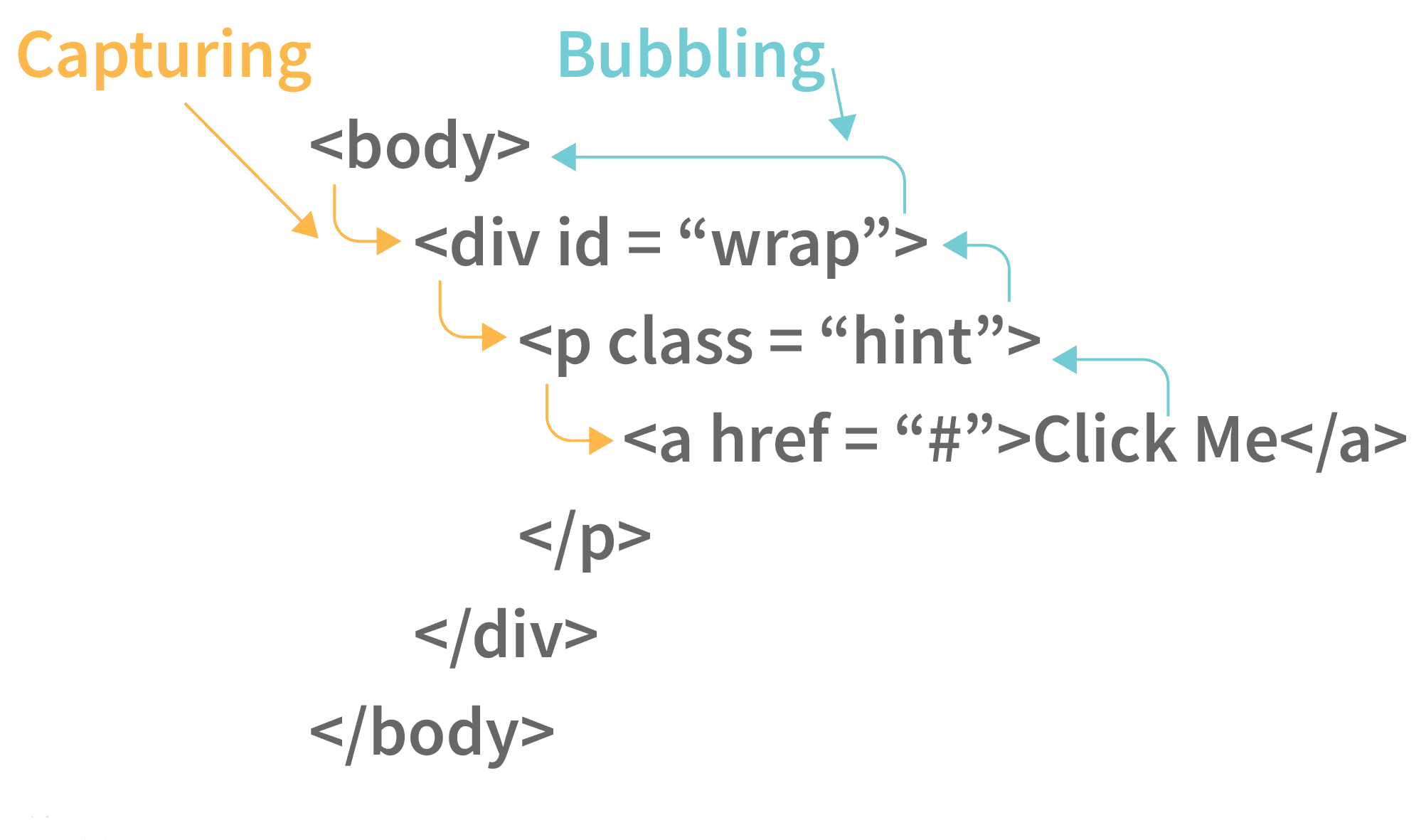
Event Propagation in JavaScript

When an event is fired on an element with parent elements, the above picture shows how the event travels through the DOM tree at different stages of event propagation. Event propagation in current browsers is divided into two phases: capturing and bubbling.

  • The Capturing Phase: In the capturing phase, events propagate from the window down through the DOM tree to the target node.
    Example: If a user clicks a hyperlink, the click event passes through<html>, <body>, and <p> containing the link.
    If any ancestor (parent, grandparent, etc.) or the target itself has a specially registered capturing event listener, those listeners are executed during this phase.
  • The Bubbling Phase: From the target element up to the window, the DOM tree visits all ancestors of the target element one by one.
    Example: When a hyperlink is clicked, the event passes via the <p> containing the link, then <body>, <html>, and the document.
    If the target element or any ancestor has event handlers for that event, they run during this phase. By default, all event handlers in modern browsers are registered in the bubbling phase.

7. JavaScript Events.

Things that can happen to HTML components and are executed by the user in JavaScript are called events. These events can be detected by the programming language, which can then be used to activate code actions. Without them, no JavaScript cheat sheet would be complete. Let us take a look at some of the events supported by JavaScript:

  • Mouse Events:

    • onclick – When a user clicks on an element, an event is triggered.
    • oncontextmenu — When a user right-clicks on an element, a context menu appears.
    • ondblclick — When a user double-clicks on an element.
    • onmousedown — When a user presses the mouse button over an element.
    • onmouseenter — The mouse pointer is moved to a certain element.
    • onmouseleave — The pointer leaves an element.
    • onmousemove — When the pointer is moved over an element.
    • onmouseover — When the cursor is moved onto an element or one of its descendants, the term onmouseover is used.
    • onmouseout — When the user moves the mouse cursor away from an element or one of its descendants, it is called onmouseout.
    • onmouseup —When a user releases a mouse button while hovering over an element, it is known as onmouseup.
  • Form Events:

    • onblur — When an element loses focus.
    • onchange — When a form element’s content changes.
    • onfocus – When an element is brought into focus.
    • onfocusin — When an element is about to gain focus.
    • onfocusout — When an element is about to lose focus.
    • oninput — When a user inputs something.
    • oninvalid — When an element isn’t valid.
    • onreset — When a form is reset.
    • onsearch — When a user enters text into a search field.
    • onselect — When the user selects some text.
    • onsubmit — When a form is submitted.
  • Drag Events:

    • ondrag — When an element is dragged.
    • ondragend — When an element finishes being dragged.
    • ondragenter — When a dragged element enters a drop target.
    • ondragleave — When a dragged element leaves a drop target.
    • ondragover — When a dragged element is over a target.
    • ondragstart — When dragging starts.
    • ondrop — When a dragged element is dropped.
  • Keyboard Events:

    • onkeydown — When the user presses a key down.
    • onkeypress — When the user begins pressing a key.
    • onkeyup — When a key is released.
  • Frame Events:

    • onabort — The loading of media is aborted.
    • onerror — When an error occurs loading a file.
    • onpagehide – When a user leaves a webpage.
    • onpageshow — When a user navigates to a webpage.
    • onhashchange — When the URL hash changes.
    • onload — When an object has loaded.
    • onresize — When the window is resized.
    • onscroll — When an element is scrolled.
    • onbeforeunload — Before a document is unloaded.
    • onunload — When a page is unloaded.
  • Animation Events:

    • animationstart — When a CSS animation starts.
    • animationend — When a CSS animation ends.
    • animationiteration — When a CSS animation repeats.
  • Clipboard Events:

    • oncut — When content is cut.
    • onpaste — When content is pasted.
    • oncopy — When content is copied.
  • Media Events:

    • onloadeddata — When media data is loaded.
    • onloadedmetadata — When metadata is loaded.
    • onloadstart — When media begins to load.
    • onabort — When media loading is aborted.
    • onerror — When a media error occurs.
    • onpause — When media is paused.
    • onplay — When media starts playing.
    • onstalled — When loading stalls.
    • oncanplay — When media is ready to play.
    • oncanplaythrough — When media can play fully.
    • ondurationchange — When duration changes.
    • onended — When playback ends.
    • onsuspend — When media loading is suspended.
    • ontimeupdate — When time updates.
    • onvolumechange — When volume changes.
    • onwaiting — When buffering/waiting.
    • onplaying — When playback resumes.
    • onprogress — When media is downloading.
    • onratechange — When playback speed changes.
    • onseeking — When user seeks media.
  • Miscellaneous Events:

    • transitionend — When a CSS transition ends.
    • onmessage — When a message is received.
    • onpopstate — When history state changes.
    • onshow — When a menu is shown.
    • onoffline — When the browser goes offline.
    • ononline — When the browser goes online.
    • ontouchcancel — When touch is interrupted.
    • ontouchstart — When a finger touches the screen.
    • onstorage — When storage changes.
    • ontoggle — When a <details> element toggles.
    • onwheel — When the mouse wheel scrolls.
    • ontouchend — When a finger is removed.
    • ontouchmove — When a finger moves on screen.

8. JavaScript Browser Objects.

JavaScript is also capable of taking note of the user's browser activity and incorporating its properties into the code, in addition to HTML elements.

Window Properties

  • history — Provides the window's History object.
  • innerHeight — Inner content height of the window.
  • innerWidth — Inner content width of the window.
  • closed — Returns true/false if the window is closed.
  • pageXOffset — Horizontal scroll offset.
  • pageYOffset — Vertical scroll offset.
  • navigator — Returns the Navigator object.
  • opener — Reference to the window that created this window.
  • outerHeight — Total window height including toolbars.
  • outerWidth — Total window width including toolbars.
  • defaultStatus — Default text in window’s status bar.
  • document — Returns the Document object.
  • frames — All iframe elements in the window.
  • length — Number of iframes in the window.
  • location — Returns the Location object.
  • name — Sets/returns the window’s name.
  • parent — Returns the parent window.
  • screen — Returns the Screen object.
  • screenLeft — Horizontal coordinate of window.
  • screenTop — Vertical coordinate of window.
  • self — Returns the current window.
  • status — Status bar text.
  • top — Returns the topmost browser window.
  • screenX — Same as screenLeft (for some browsers).
  • screenY — Same as screenTop (for some browsers).

Window Methods

  • alert() — Shows a message in an alert box.
  • setInterval() — Runs code at specified intervals.
  • setTimeout() — Runs code after a specified delay.
  • clearInterval() — Cancels a setInterval timer.
  • clearTimeout() — Cancels a setTimeout timer.
  • open() — Opens a new browser window.
  • print() — Prints the current window content.
  • blur() — Removes focus from window.
  • moveBy() — Moves window by given offsets.
  • moveTo() — Moves window to specific coordinates.
  • close() — Closes the window.
  • confirm() — Shows confirmation dialog.
  • focus() — Brings window into focus.
  • scrollBy() — Scrolls by a specified amount.
  • scrollTo() — Scrolls to specific coordinates.
  • prompt() — Shows input dialog.
  • resizeBy() — Resizes window by given values.
  • resizeTo() — Resizes window to exact size.
  • stop() — Stops window loading.

Screen Properties

  • height — Full height of the screen.
  • pixelDepth — Screen color resolution (bits per pixel).
  • width — Full width of the screen.
  • colorDepth — Bit depth of color palette.
  • availableHeight — Screen height excluding taskbar.
  • availableWidth — Screen width excluding taskbar.

9. JavaScript Date Objects

Dates are extremely important to deal with while creating most types of applications. JavaScript also allows you to deal with and change dates and times. The next section of the JavaScript cheat sheet is how to work on dates:

Setting Dates:

  • Date() — Returns a new date object that contains the current date and time.
  • Date(1993, 6, 19, 5, 12, 50, 32) — We can create a custom date object with the pattern as Year, month, day, hour, minutes, seconds, and milliseconds are represented by the numbers. Except for the year and month, we can omit anything we like.
  • Date("1999-12-22") — Date as a string declaration

Getting the values of Time and Date:

  • getDate() — returns the month's day as a number (1-31)
  • getTime() — Get the milliseconds since January 1, 1970
  • getUTCDate() — returns the month's day in universal time (also available for day, month, full year, hours, minutes etc.)
  • getMilliseconds() — Returns the milliseconds (0-999)
  • getMinutes() — Returns the current minute (0-59)
  • getMonth() — returns the current month (0-11)
  • parse — Returns the number of milliseconds since January 1, 1970 from a string date
  • getDay() — Returns a number representing the weekday (0-6)
  • getFullYear() — Returns the year as a 4-digit value (yyyy)
  • getHours() — Returns the current hour (0-23)
  • getSeconds() — Returns the seconds (0-59)

Setting a Part of the Dates:

  • setDate() — Returns the current date (1-31)
  • setFullYear() — Sets the year (optionally month and day)
  • setMonth() — Sets the month (0-11)
  • setSeconds() — Sets the seconds (0-59)
  • setTime() — Sets the time (milliseconds since Jan 1, 1970)
  • setMinutes() — Sets the minutes (0-59)
  • setUTCDate() — Sets the day in universal time (also available for day, month, year, hours, minutes, etc.)
  • setHours() — Changes the time (0-23)
  • setMilliseconds() — Sets the milliseconds (0-999)

10. Numbers and Mathematics in JavaScript.

JavaScript provides various properties and methods to deal with Numbers and Maths. Let us have a quick look at those:

Numbers Properties:

  • MAX VALUE — The maximum numeric value that JavaScript can represent.
  • NaN — The "Not-a-Number" value is NaN.
  • NEGATIVE INFINITY — The value of Infinity is negative.
  • POSITIVE INFINITY — Infinity value that is positive.
  • MIN VALUE — The smallest positive numeric value that JavaScript can represent.

Numbers Methods:

  • toString() — Returns a string representation of a number.
  • toFixed() — Returns a number's string with a specified number of decimals.
  • toPrecision() — Converts a number to a string of a specified length.
  • valueOf() — Returns a number in its original form.
  • toExponential() — Returns a rounded number in exponential notation as a string.

Maths Properties:

  • E — Euler's number.
  • SQRT1_2 — Square root of 1/2.
  • SQRT2 — Square root of two.
  • LOG2E — Base 2 logarithm of E.
  • LN2 — Natural logarithm of 2.
  • LN10 — Natural logarithm of 10.
  • LOG10E — Base 10 logarithm of E.
  • PI — The mathematical constant π.

Maths Methods:

  • exp(x) — ex value.
  • floor(x) — Rounds x down to the nearest integer.
  • log(x) — Natural logarithm (base e) of x.
  • abs(x) — Returns the absolute value of x.
  • acos(x) — Arccosine of x (radians).
  • asin(x) — Arcsine of x (radians).
  • pow(x,y) — x to the power of y.
  • random() — Returns a random number between 0 and 1.
  • round(x) — Rounds x to the nearest integer.
  • sin(x) — Sine of x (radians).
  • sqrt(x) — Square root of x.
  • tan(x) — Tangent of x.
  • atan(x) — Arctangent of x.
  • atan2(y,x) — Arctangent of y/x.
  • ceil(x) — Rounds x up to the next integer.
  • cos(x) — Cosine of x (radians).
  • max(x,y,...,n) — Returns the largest number.
  • min(x,y,...,n) — Returns the smallest number.

11. JavaScript Regular Expressions.

Regular expressions can be defined as search patterns that can be used to match string character combinations. Text search and text replace procedures can both benefit from the search pattern. Let us look at how JavaScript allows Regular Expressions:

Pattern Modifiers

  • e — Used for evaluating replacement
  • i — Case-insensitive matching
  • U — Ungreedy pattern
  • g — Global matching
  • m — Multiple line matching
  • s — Treats string as a single line
  • x — Allows comments and whitespace in pattern

Metacharacters

  • . — Any character except newline
  • \w — Word characters
  • \W — Non-word characters
  • \s — Whitespace characters
  • \S — Non-whitespace characters
  • \b — Matches at start/end of a word
  • \B — Matches not at start/end of a word
  • \0 — NULL character
  • \n — New line character
  • \f — Form feed
  • \r — Carriage return
  • \t — Tab character
  • \v — Vertical tab
  • \d — Digits
  • \D — Non-digit characters
  • \xxx — Octal character
  • \xdd — Hexadecimal character
  • \uxxxx — Unicode character

Brackets

You can group parts of a regular expression together by putting them inside parentheses. Square brackets define character classes, while curly braces define quantifiers with precise bounds.

  • [abc] — Finds characters a, b, or c
  • (a|b|c) — Alternatives separated with |
  • [^abc] — Any character not in brackets
  • [0-9] — Digits 0 to 9
  • [A-z] — Characters A to z

Quantifiers

Quantifiers specify the number of times a character, group, or character class must appear to match.

  • n+ — One or more n
  • n* — Zero or more n
  • n? — Zero or one n
  • ^n — n at the start
  • ?=n — Followed by n
  • ?!n — Not followed by n
  • n{X} — Exactly X n’s
  • n{X,Y} — Between X and Y n’s
  • n{X,} — X or more n’s
  • n$ — n at the end

12. JavaScript Data Transformation

Data Transformation in JavaScript can be done with the usage of higher-order functions. Higher-order functions are those functions in JavaScript which can accept one or more functions as inputs and return a function as the result. All higher-order functions that take a function as input are map(), filter(), and reduce(). Because all of these functions are part of the JavaScript Array prototype, they can be used directly on an array.

map() method

The map() method applies a function to each array element and returns a new array of the same length with transformed values.

var arr = [10, 20, 30];
var triple = arr.map(x => x * 3);
triple; // [30, 60, 90]

filter() method

The filter() method creates a new array containing only the elements that satisfy a given condition.

var arr = [13, 40, 47];
var odd = arr.filter(x => x % 2);
odd; // [13, 47]

reduce() method

The reduce() method reduces an array to a single value by executing a callback on each element with an accumulator.

var arr = [10, 20, 30];
var counter = 0;
let answer = arr.reduce((accumulator, value) => value + accumulator, counter);
console.log(answer); // 60

13. JavaScript Fundamentals.

Writing JavaScript code in an HTML page

We must enclose the JavaScript code within the <script> tag in order to include it on an HTML page:

<script type="text/javascript">
// JavaScript coding can be done inside this tag
</script>

With this information, the browser can correctly recognize the code as JavaScript and execute it.

Inclusion of external JavaScript files in an HTML file

An external JavaScript file can also be written separately and included within our HTML file. This helps keep code organized. For example, if our JavaScript code is in script.js, we can include it as follows:

<script src="script.js"></script>

Usage of Comments in JavaScript coding

Comments are extremely useful in programming because they help explain what’s happening in your code. JavaScript supports two types of comments:

  • Single-line comments: Start with //
  • Multi-line comments: Wrap with /* and */

14. JavaScript Strings.

Strings are nothing but a combination of characters that can be used to perform a variety of tasks. JavaScript provides many methods for working with Strings, so they deserve a dedicated section in this cheat sheet. Let’s explore escape sequences and common string methods:

Escape Sequences or Escape Characters

An escape character changes the meaning of the characters that follow it. In JavaScript, strings are enclosed by single or double quotes. To use special characters like quotes inside a string, you need escape sequences:

  • \' — Single quotes
  • \" — Double quotes
  • \t — Horizontal tab
  • \v — Vertical tab
  • \\ — Backslash
  • \b — Backspace
  • \f — Form feed
  • \n — Newline
  • \r — Carriage return

String Methods

JavaScript provides a wide range of methods to manipulate and work with strings:

  • toLowerCase() — Converts a string to lowercase
  • toUpperCase() — Converts a string to uppercase
  • charAt() — Returns the character at a given index
  • charCodeAt() — Returns the Unicode of a character at an index
  • fromCharCode() — Creates a string from UTF-16 code units
  • concat() — Joins multiple strings into one
  • match() — Retrieves matches of a string against a pattern
  • replace() — Finds and replaces text in a string
  • indexOf() — Index of the first occurrence of text
  • lastIndexOf() — Index of the last occurrence (searches backward)
  • search() — Executes a search and returns the index
  • substr() — Extracts substring based on number of characters
  • slice() — Extracts a section of a string
  • split() — Splits a string into an array
  • substring() — Similar to slice but no negative positions
  • valueOf() — Returns the primitive value of a string

15. JavaScript Closures.

A closure is a function that has been bundled together (enclosed) with references to its surrounding scope (the lexical environment). In simple terms, a closure allows an inner function to access the variables of its outer function, even after the outer function has finished execution. Closures are created every time a function is defined in JavaScript.

Example of a Closure

function subtractor(subtractingInteger) {
  return function(a) {
    return a - subtractingInteger;
  };
}

var subtract2 = subtractor(2);
var subtract5 = subtractor(5);

console.log(subtract2(5));  // 3 is logged
console.log(subtract5(5));  // 0 is logged

In this example, the subtractorfunction takes one parameter (subtractingInteger) and returns a new function. The returned function accepts one input,a, and returnsa - subtractingInteger.

The subtractor function acts as a function factory — it generates new functions with a “captured” environment:

  • subtract2 subtracts2 from its input.
  • subtract5 subtracts5 from its input.

Both subtract2 andsubtract5 share the same function body, but each one “remembers” its own lexical environment. That’s the power of closures.

16. JavaScript Hoisting

Hoisting in JavaScript is the process where the interpreter appears to move the declarations of functions, variables, and classes to the top of their scope before code execution. Thanks to hoisting, functions can be used before they are defined. Variables and classes are also hoisted, but only their declarations, not their initializations, which can lead to unexpected results if misused.

There are two main types of hoisting in JavaScript:

1. Function Hoisting

With function hoisting, you can safely call a functionbefore it is defined in the code. Without hoisting, the function would have to be declared first.

display("Lion");

function display(inputString) {
  console.log(inputString); // 'Lion' gets logged
}

2. Variable Hoisting

Variables declared with varare hoisted, but only their declarations, not their initializations. This means a variable can be referenced before it’s initialized, but it will returnundefined until the actual assignment line is executed.

console.log(x); 
// 'undefined' is logged due to hoisting

var x;  // Declaration is hoisted
x = 7;  // Initialization happens here

console.log(x); 
// 7 is logged after initialization

⚠️ While hoisting makes code execution flexible, relying too much on it can cause confusing bugs. It’s considered best practice to declare and initialize variables and functions before using them.

17. Scope and Scope Chain in JavaScript.

1. Scope

In JavaScript, scope determines the accessibility or visibility of variables. It defines where variables can be accessed within the program. There are three main types of scope:

Global Scope

Variables declared outside of any function or block belong to the global scope. They can be accessed from anywhere in the program.

var hello = 'Hello!';
function sayHello() {
  console.log(hello); // 'Hello!' gets logged
}
sayHello();

Local / Function Scope

Variables declared inside a function are only accessible within that function. They cannot be accessed from outside.

function sayHello() {
  var hello = 'Hello!';
  console.log(hello); // 'Hello!' gets logged
}
sayHello();

console.log(hello); 
// ReferenceError: hello is not defined

Block Scope

ES6 introduced block scope with letand const. Variables declared inside { } cannot be accessed outside that block.

{
  let hello = 'Hello!';
  var language = 'Hindi';
  console.log(hello); // 'Hello!' gets logged
}

console.log(language); // 'Hindi' gets logged
console.log(hello); 
// ReferenceError: hello is not defined

2. Scope Chain

When a variable is used, the JavaScript engine first looks in the current scope. If it’s not found, it checks the outer scope, continuing until it reaches the global scope. If still not found:

  • In non-strict mode, it may create a global variable implicitly.
  • In strict mode, it throws an error.
let a = 'a';

function foo() {
  let b = 'b';
  console.log(b); // 'b'
  console.log(a); // 'a'
  
  randomNumber = 33; 
  console.log(randomNumber); // 33 (created globally if not in strict mode)
}
foo();

👉 The engine traverses the scope chain step by step until it finds the variable, or else it throws an error (in strict mode).

18. JavaScript Functions

JavaScript Functions can be defined as chunks of code written in JavaScript to perform a single task. A function in JavaScript looks like this:

function nameOfTheFunction(parameterOne, parameterTwo, parameterThree, parameterFour,....,parameterN) {
   // Job or Task of the function 
}

The code above consists of the function keyword and a name, as you can see. The parameters of the function are enclosed in brackets, while the function's task code and output is enclosed in curly brackets. You can make your own, but there are a few default functions to make your life easier. Although we will be discussing various methods throughout this cheat sheet, let us discuss in brief two important types of JavaScript functions in this section:

  • Functions For Throwing Data As Output:

    The output of data is a common application for functions. You have the following options for outputting data:

    • prompt(): Creates a dialogue box for taking input from the user.
    • alert(): Outputs information in an alert box in the browser window.
    • console.log(): Writes data to the browser's console (used for debugging).
    • document.write(): Writes straight to the HTML document.
    • confirm(): Opens a yes/no dialogue box and returns a boolean depending on the user's click.
  • Global Functions:

    Every browser that can run JavaScript has a set of global functions built-in. Some of them are:

    • parseFloat(): Parses the argument and returns a floating-point number.
    • parseInt(): Parses the argument and returns an integer.
    • encodeURI(): Encodes a URI into UTF-8.
    • decodeURI(): Decodes a URI made by encodeURI().
    • encodeURIComponent(): Encodes URI components.
    • decodeURIComponent(): Decodes a URI component.
    • isNaN(): Determines if a value is Not a Number.
    • Number(): Converts the argument into a number.
    • eval(): Evaluates JavaScript code from a string.
    • isFinite(): Checks if a value is finite.

19. JavaScript Arrays

Arrays are the next item on our JavaScript cheat sheet. Arrays are used in a variety of programming languages. They are a method of categorising variables and attributes. Arrays can be defined as a collection of objects of the same type. In JavaScript, here's how one can make an array of cars:

var cars = ["Mercedes", "Tesla", "Volvo"];

Now that we understand how to make arrays, we can perform a bunch of operations on them. Let us take a look at some JavaScript methods which can be used to perform various types of operations on arrays:

  • pop(): Removes the last element of an array.
  • push(): Adds a new element at the end of an array.
  • concat(): Joins multiple arrays into a single array.
  • reverse(): Reverses the order of elements in an array.
  • shift(): Removes the first element of an array.
  • slice(): Returns a shallow copy of a portion of an array.
  • splice(): Adds/removes elements at a specific position.
  • toString(): Converts array elements into a string.
  • unshift(): Adds new elements at the beginning of an array.
  • valueOf(): Returns the primitive value of the array object.
  • indexOf(): Returns the first index of a given element.
  • lastIndexOf(): Returns the last index of a given element.
  • join(): Combines all elements into a single string.
  • sort(): Sorts the elements of an array.

20. JavaScript If-Else Statements

The if-else statements are simple to comprehend. You can use them to set conditions for when your code runs. If specific requirements are met, something is done; if they are not met, another action is taken. The switch statement is a concept comparable to if-else. The switch however allows you to choose which of several code blocks to run.

Syntax of if-else in JavaScript:

if (check condition) {
   // block of code if condition is satisfied
} else {
   // block of code if condition is not satisfied
}

Loops in JavaScript:

Most programming languages include loops. They let you run code blocks as many times as you like with different values. Loops can be created in a variety of ways in JavaScript:

  • for loop: The most frequent way of creating a loop in JavaScript.
for (initialization; condition; update) {
   // code to be executed in loop
}
  • while loop: Establishes the condition under which a loop will run.
// Initialization before loop
while(condition) {
   // code to be executed
   // update loop variable
}
  • do-while loop: Similar to while, but executes at least once.
// Initialization before loop
do {
   // code to be executed
   // update loop variable
} while(condition);

There are two important statements in the context of loops:

  • continue: Skips parts of the loop if conditions are met.
  • break: Stops and exits the loop when conditions are met.

21. JavaScript Operators.

You can use variables to conduct a variety of tasks using JavaScript operators. The various types of operators in JavaScript are as follows:

Fundamental Operators

These operators perform basic operations like addition, multiplication, etc.

  • +: Addition
  • -: Subtraction
  • *: Multiplication
  • /: Division
  • (...): Grouping operator, evaluates expressions in parentheses first
  • %: Modulus (remainder)
  • ++: Increment
  • --: Decrement

Bitwise Operators

  • &: AND
  • |: OR
  • ~: NOT
  • ^: XOR
  • <<: Left shift
  • >>: Right shift

Comparison Operators

  • ==: Equality (type conversion allowed)
  • ===: Strict equality (no type conversion)
  • !=: Inequality
  • !==: Strict inequality
  • ?: Conditional (ternary) operator
  • >: Greater than
  • <: Less than
  • >=: Greater than or equal to
  • <=: Less than or equal to

Logical Operators

  • &&: Logical AND
  • ||: Logical OR
  • !: Logical NOT

22. Javascript Data Types.

Different types of values and data can be stored in JavaScript variables. To assign values to JavaScript variables, you use the equals "=" sign operator. The various data types in JavaScript are as follows:

  • Numbers: Numerical values (real or integer). Example: var id = 100
  • Variables: Values that can change. Example: var y
  • Text (Strings): Combination of characters. Example: var demoString = "Hello World"
  • Operations: Assigned expressions. Example: var sum = 20 + 30 + 29
  • Boolean values: True or false. Example: var booleanValue = true
  • Constant numbers: Fixed values. Example: const g = 9.8
  • Objects: Containers for named properties and methods. Example: var name = {name:'Jon Snow', id:'AS123'}
JavaScript Data Types
Note: It is important to remember that variables in JavaScript are case-sensitive. As a result, "small" and "Small" will be treated as separate variables in JavaScript.

23. Javascript Variables

Variables in JavaScript are simply names of storage locations. In other words, they can be considered as stand-in values that we can use to perform various operations in our JavaScript codes. JavaScript allows the usage of variables in the following three ways:

  • var: The most commonly used variable in JavaScript is var. It can be redeclared and its value can be reassigned, but only inside the context of a function. Variables defined using var are hoisted to the top.
    var x = 140; // variable x can be reassigned a new value and also redeclared
  • const: const variables cannot be used before they appear in the code. They cannot be reassigned or redeclared.
    const x = 5; // variable x cannot be reassigned a new value or redeclared
  • let: The let variable cannot be redeclared, but it can be reassigned a new value.
    let x = 202; // variable x cannot be redeclared but can be reassigned a new value

JavaScript MCQ

1. Let us say that we want to transform a text “butterfly” to a string without utilising the “new” operator and without using another variable. Which of the following is the correct way to do so:

2. What will be the output of the JavaScript code snippet given below?

JavaScript with Statement Example

The with statement extends the scope chain for a statement. Note: it's discouraged in modern JS.

var a = 23, b = 4;
var demoObject = { a: 33 };
with(demoObject) {
    alert(b);
}

3. What will be the output of the JavaScript code snippet given below?

JavaScript Switch Statement Example

This example uses a switch statement to determine a value based on the variable ch.

var ch = 'D';
var answer;
switch(ch) {
  case 'A': answer += "100"; break;
  case 'B': answer += "90"; break;
  case 'C': answer += "80"; break;
  default: answer += "70";
}
console.log(answer);

4. What will be the output of the JavaScript code snippet given below?

JavaScript Function Example

This example demonstrates a simple comparison using a JavaScript function.

function foo() {
  var a = 65;
  var b = 65;
  if(a.toString() == b)
    return 1;
  else
    return 0;
}

5. What will be the output of the JavaScript code snippet given below?

<script type="text/javascript">
  var x = 2 + "3";
  document.write(x);
</script>

6. What will be the output of the JavaScript code snippet given below?

var a = "11";  
var counter = 22;  
alert(a + counter);

7. What will be the output of the JavaScript code snippet given below?

var aval = 1;  
while (aval <= 50)  
{  
    console.log(aval);  
    aval++;  
}

8. What will be the output of the JavaScript code snippet given below?

function conditionCheck() {  
  var a = 65;  
  var b = 65;  
  if (a == b)  
    return 1;  
  else  
    return 0;  
}

9. What will be the output of the JavaScript code snippet given below?:

var a = 68;  
var b = 67;  
var c = 66;  
if (a > b)  
  document.write(a);  
else if (a > c)  
  document.write(a);  
else  
  document.write(c);

10. Which of the following methods can be used to access class elements in JavaScript?

11. What will be the output of the following code snippet?

const obj1 = {first: 20, second: 30, first: 50};
console.log(obj1);

12. What will be the output of the following code snippet?

let a = [1, 2, 3, 4, 5, 6];
var left = 0, right = 5;
var found = false;
var target = 5;
while(left <= right) {
   var mid = Math.floor((left + right) / 2);
   if(a[mid] == target) {
       found = true;
       break;
   }
   else if(a[mid] < target) {
       left = mid + 1;
   }
   else {
       right = mid - 1;
   }
}
if(found) {
   console.log("YES");
}
else {
   console.log("NO");
}

13. What will be the output of the following code snippet?

console.log(typeof(NaN));

14. What will be the output of the following code snippet?

let s = "00000001111111";
let l = 0, r = s.length - 1, ans = -1;
while(l <= r) {
   var mid = Math.floor((l + r) / 2);
   if(s[mid] == '1') {
       ans = mid;
       r = mid - 1;
   }
   else {
       l = mid + 1;
   }
}
console.log(ans);

15. What will be the output of the following code snippet?

const example = ({ a, b, c }) => {
  console.log(a, b, c);
};
example(0, 1, 2);

16. What will be the output of the following code snippet?

function solve(arr, rotations){
 if(rotations == 0) return arr;
 for(let i = 0; i < rotations; i++){
   let element = arr.pop();
   arr.unshift(element);
 }
 return arr;
}
// solve([44, 1, 22, 111], 5);

17. What will be the output of the following code snippet?

var a = Math.max();
var b = Math.min();
console.log(a);
console.log(b);

18. What will be the output of the following code snippet?

const set = new Set();
set.add(5);
set.add('Hello');
set.add({ name: 'Scaler' });

for (let item of set) {
  console.log(item + 6);
}

19. What will be the output of the following code snippet?

var a = "hello";
var sum = 0;
for (var i = 0; i < a.length; i++) {
   sum += (a[i] - 'a');
}
print(sum);

20. What will be the output of the following code snippet?

function test(...args) {
  console.log(typeof args);
}
test(12);

21. What will be the output of the following code snippet?

var a = true + true + true * 3;
print(a);

22. What will be the output of the following code snippet?

a = [1, 2, 3, 4, 5];
print(a.slice(2, 4));

23. What will be the output of the following code snippet?

var a = 1;  
var b = 0;  
while (a <= 3)  
{  
   a++;  
   b += a * 2;  
   print(b);
}

24. What will be the output of the following code snippet?

(function(){
  setTimeout(() => console.log(1), 2000);
  console.log(2);
  setTimeout(() => console.log(3), 0);
  console.log(4);
})();

25. What will be the output of the following code snippet?

<script type="text/javascript" language="javascript">
  
var a = "Scaler";
var result = a.substring(2, 4);
document.write(result);
  
</script>

26. When an operator’s value is NULL, the typeof returned by the unary operator is:

27. When the switch statement matches the expression with the given labels, how is the comparison done?

28. Which function is used to serialize an object into a JSON string in Javascript?

29. Which object in Javascript doesn’t have a prototype?

30. Which of the following are closures in Javascript?

31. Which of the following are not server-side Javascript objects?

32. Which of the following is not a Javascript framework?

33. Which of the following keywords is used to define a variable in Javascript?

34. Which of the following methods can be used to display data in some form using Javascript?

35. Which of the following methods is used to access HTML elements using Javascript?

36. What is the use of the <noscript> tag in Javascript?

37. How can a datatype be declared to be a constant type?

38. How do we write a comment in javascript?

39. How to stop an interval timer in Javascript?

40. Javascript is an _______ language?

41. The 3 basic object attributes in Javascript are:

42. The process in which an object or data structure is translated into a format suitable for transferral over a network, or storage is called?

43. Upon encountering empty statements, what does the Javascript Interpreter do?

44. What does the Javascript “debugger” statement do?

45. What does the ‘toLocateString()’ method do in JS?

46. What does … operator do in JS?

47. What happens when we run this code?

function dog() {
   print("I am a dog.");
}
dog.sound = "Bark";

48. What is the output of the following code snippet?

print(NaN === NaN);

49. How are objects compared when they are checked with the strict equality operator?

50. What keyword is used to check whether a given property is valid or not?

51. What keyword is used to declare an asynchronous function in Javascript?

52. What will be the output for the following code snippet?

<p id="example"></p>  
<script>  
function Func() {  
  document.getElementById("example").innerHTML = Math.sqrt(81);  
}  
</script>

53. What will be the output of the following code snippet?

(function(a){
  return (function(){
    console.log(a);
    a = 6;
  })()
})(21);

54. What will be the output of the following code snippet?

let n = 24;
let l = 0, r = 100, ans = n;
while(l <= r) {
   let mid = Math.floor((l + r) / 2);
   if(mid * mid <= n) {
       ans = mid;
       l = mid + 1;
   } else {
       r = mid - 1;
   }
}
print(ans);

55. What will be the output of the following code snippet?

let sum = 0; 
const a = [1, 2, 3];
a.forEach(getSum);
print(sum);
function getSum(ele) {
   sum += ele;
}

56. What will be the output of the following code snippet?

print(parseInt("123Hello"));
print(parseInt("Hello123"));

57. What will be the output of the following code snippet?

var a = Math.max() < Math.min();
var b = Math.max() > Math.min();
print(a);
print(b);

58. What will be the output of the following code snippet?

var x = 12;
var y = 8;
var res = eval("x+y");
document.write(res);

59. What will be the output of the following code snippet?

<script type="text/javascript">
a = 5 + "9";
document.write(a);
</script>

60. What will be the output of the following code snippet?

const obj1 = { Name: "Hello", Age: 16 };
const obj2 = { Name: "Hello", Age: 16 };
print(obj1 === obj2);